As an Amazon Associate, we earn from qualifying purchases. Some links on this site are affiliate links at no extra cost to you. Our recommendations are based on thorough research and editorial judgment.

9 Best Creality 3D Printer Models That Hobbyists Swear By

You’re midway through a weekend project when a print warps across the first few layers, leaving a crooked gear that won’t mesh with its mate and a ruined afternoon of tinkering. Or you’ve set up a cabinet-sized build only to find your filament jams every 30 minutes and the layers aren’t bonding, wasting material and time.
What separates a dependable machine from one that frustrates is often overlooked: build volume versus nozzle capability, motion system stability, and filament-path design — plus underestimating cooling and tuned slicer settings. Buyers commonly fixate on price or print speed and ignore bed adhesion and extruder reliability.
This guide reviews nine Creality models chosen for real-world performance, print quality, hardware variety, and user support.
Read on to learn which model matches your parts, materials, and workspace, plus practical tuning tips.
Key Takeaways
If you’re on a tight budget and just want to reliable printer that gets you making parts, the Ender 3’s 220×220×250 mm build and resume-print feature make it easy to start, and the huge community helps you tune settings. It’s a great first upgrade path if you want to learn without spending much. Simple and dependable.
For anyone who needs quick setup and wants to print flexible filaments or taller models, the Ender 3 V3 SE’s Sprite dual-gear direct extruder plus dual Z and dual Y shafts give you stability and better filament control. You’ll get fewer jams and cleaner flexible prints right away. Fast to get running.
What makes this CoreXZ-style machine stand out for you is speed with precision, because the Ender 3 V3 Plus pairs a direct drive and tri‑metal nozzle with a CoreXZ motion system for finer, quicker prints. If you want faster print times without sacrificing detail, this one helps. Serious hobbyists will like it.
You get a giant build volume without a flimsy frame when you need to print big parts or batches, since the Ender‑5 Max offers a 400×400×400 mm build and a solid metal frame plus a dual‑gear extruder and 36‑point auto‑leveling system that cuts setup time. This is useful if you prototype larger items or run small production jobs at home. Big and steady.
The K2 Combo is perfect for makers who want multicolor parts without managing multiple machines, because its CFS unit can handle up to 16 colors and the high‑flow hotend with a hardened nozzle keeps prints moving quickly. You’ll appreciate the dual Z and aluminum frame when you push speed and multi-material prints. Multicolor made easier.
| Creality K2 Combo 3D Printer — Multicolor High-Speed | 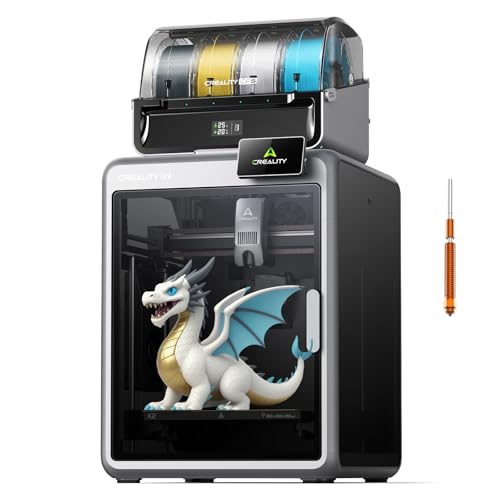 | Best For Multicolor | Build Volume (or Product Type/Size for non-printers): 260 × 260 × 260 mm | Max Print Speed (or performance spec): Up to 600 mm/s | Extruder / Nozzle Type (compatibility / material): Direct drive extruder; hardened steel nozzle (rated to 300 °C) | VIEW LATEST PRICE | Read Our Analysis |
| Creality Ender-5 Max Large-Volume High-Speed 3D Printer | 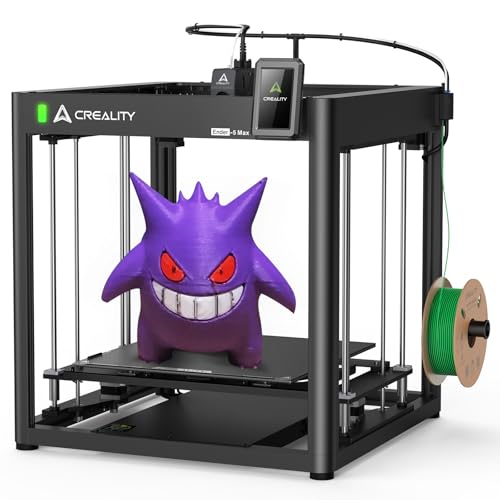 | Best Large-Bed | Build Volume (or Product Type/Size for non-printers): 400 × 400 × 400 mm | Max Print Speed (or performance spec): Up to 700 mm/s | Extruder / Nozzle Type (compatibility / material): All-metal near-end dual-gear extruder | VIEW LATEST PRICE | Read Our Analysis |
| Creality Ender 3 V3 Plus High-Speed 3D Printer |  | High-Speed Performer | Build Volume (or Product Type/Size for non-printers): 300 × 300 × 330 mm | Max Print Speed (or performance spec): Up to 600 mm/s | Extruder / Nozzle Type (compatibility / material): Direct drive extruder; tri-metal nozzle | VIEW LATEST PRICE | Read Our Analysis |
| Creality Ender 3 V3 SE 3D Printer (Upgraded) |  | Best Budget Upgrade | Build Volume (or Product Type/Size for non-printers): 220 × 220 × 250 mm | Max Print Speed (or performance spec): Up to 250 mm/s | Extruder / Nozzle Type (compatibility / material): Sprite full-metal dual-gear direct extruder | VIEW LATEST PRICE | Read Our Analysis |
| Creality 74-Piece 3D Printer Tool Kit |  | Essential Accessory Kit | Build Volume (or Product Type/Size for non-printers): Tool kit — not applicable (accessory; compact kit) | Max Print Speed (or performance spec): Tool kit — not applicable | Extruder / Nozzle Type (compatibility / material): Tool kit — includes nozzle cleaning needles and maintenance tools | VIEW LATEST PRICE | Read Our Analysis |
| Creality Hardened Steel MK8 Nozzle Kit (8pcs) |  | Best For Abrasives | Build Volume (or Product Type/Size for non-printers): Nozzle kit — not applicable (accessory; small parts) | Max Print Speed (or performance spec): Nozzle kit — not applicable (enables higher speed but no own speed) | Extruder / Nozzle Type (compatibility / material): Hardened steel MK8 nozzles (multiple sizes; up to 450 °C) | VIEW LATEST PRICE | Read Our Analysis |
| Creality Ender 3 3D Printer (Resume V-Slot) | 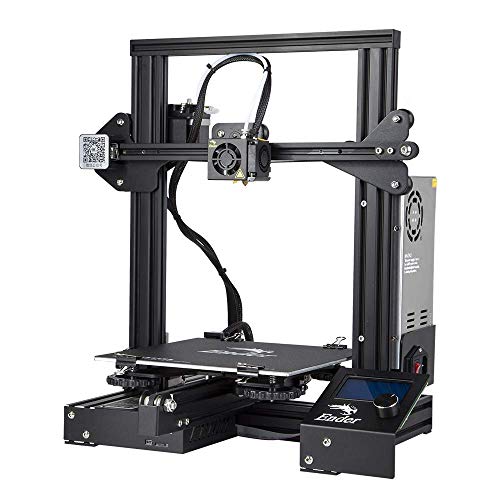 | Best Entry-Level | Build Volume (or Product Type/Size for non-printers): 220 × 220 × 250 mm | Max Print Speed (or performance spec): (Ender-3 base spec not explicitly listed) — typical consumer Ender-3 (not specified in summary) | Extruder / Nozzle Type (compatibility / material): Standard Ender-3 extruder (precision nozzle; compatible with brass/MK8-style nozzles) | VIEW LATEST PRICE | Read Our Analysis |
| Creality SPARKX I7 Combo Multi-Color 3D Printer | 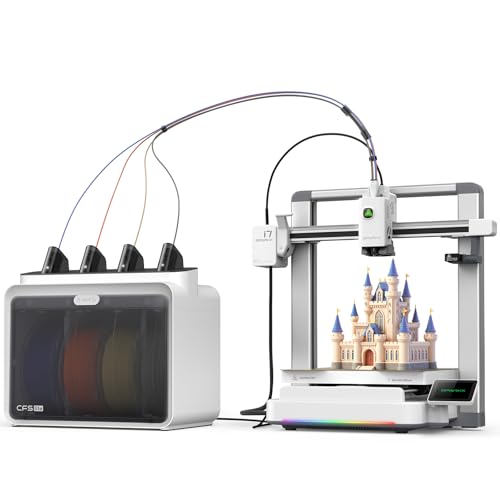 | Most Plug-and-Play | Build Volume (or Product Type/Size for non-printers): 260 × 260 × 255 mm | Max Print Speed (or performance spec): Up to 500 mm/s | Extruder / Nozzle Type (compatibility / material): (SPARKX i7) multicolor-enabled extruder system (CFS Lite / filament switching) | VIEW LATEST PRICE | Read Our Analysis |
| Creality Rainbow PLA+ 1.75mm 1KG Filament | 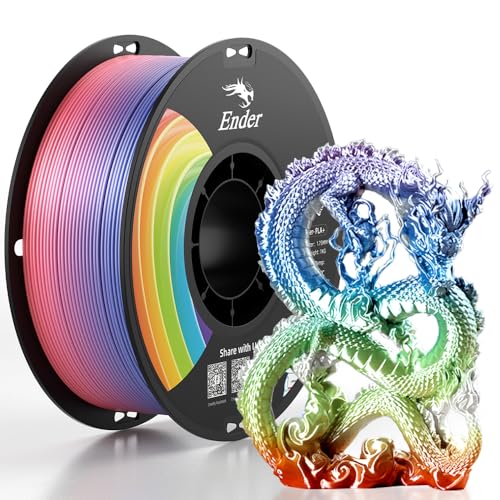 | Best Multicolor Filament | Build Volume (or Product Type/Size for non-printers): Filament spool — 1 kg spool (used for any build volume) | Max Print Speed (or performance spec): Filament — speed depends on printer (not applicable) | Extruder / Nozzle Type (compatibility / material): Filament — PLA+ (material for extruder/nozzle use) | VIEW LATEST PRICE | Read Our Analysis |
More Details on Our Top Picks
Creality K2 Combo 3D Printer — Multicolor High-Speed
If you need fast multicolor prints without slowing your workflow, the K2 Combo’s CFS unit and expandability up to four units (for as many as 16 colors) give you that flexibility. The filament switching is automatic, so your color changes stay smooth and you can focus on design, not swapping spools. Impressive.
For anyone who prints with a mix of common and tougher filaments, the direct drive extruder plus a 40 mm³/s high-flow hotend handles PLA, ABS, PETG and many engineering materials well. The hardened steel nozzle handles temperatures up to 300 °C, which helps when you want stronger, heat-resistant parts. Handy.
What makes this multicolor high-speed printer stand out is the speed and stability pairing: up to 600 mm/s top speeds with strong acceleration for quick jobs, and an aerospace-grade aluminum frame plus dual Z-axis to keep wobble low. That means you get fast prints that still look sharp when detail matters. Nice.
- Build Volume (or Product Type/Size for non-printers):260 × 260 × 260 mm
- Max Print Speed (or performance spec):Up to 600 mm/s
- Extruder / Nozzle Type (compatibility / material):Direct drive extruder; hardened steel nozzle (rated to 300 °C)
- Auto-leveling / Calibration:Smart auto leveling; guided calibration
- Connectivity / Monitoring:Wi‑Fi connectivity; dual AI cameras; 8 GB local storage
- Compatible Filament / Materials:PLA, ABS, PETG, engineering-grade filaments
- Additional Feature:Expandable CFS units
- Additional Feature:Built-in air purifier
- Additional Feature:Dual AI chamber cameras
Creality Ender-5 Max Large-Volume High-Speed 3D Printer
If you need to print large prototypes or several parts at once, the 400 x 400 x 400 mm build volume gives you that space so you don’t have to split models. It also moves fast enough that long print jobs finish sooner. Quick.
For anyone who hates fiddling with filament jams, the metal frame and strong dual-gear extruder feed filament steadily and reduce clogs while lasting through plenty of prints. You’ll notice fewer interruptions during multi-hour runs. Short and practical.
What makes this 3D printer stand out for fast makers is the high-performance XY motors with 20,000 mm/s^2 acceleration and reported top speeds up to 700 mm/s, which let you move quickly without shredding detail. You can dial speed when you need it and slow down for fine parts. Handy.
You get consistent first layers without endless tweaking thanks to the 36-point auto-leveling system that scans the bed across many spots and compensates automatically. Setup feels faster, and prints adhere better right away. Easy.
The Creality Ender-5 Max solves remote print management needs by offering LAN control and Creality Print, so you can start or monitor jobs from another device instead of standing by the machine. That makes it simple to run larger batches. Nice.
- Build Volume (or Product Type/Size for non-printers):400 × 400 × 400 mm
- Max Print Speed (or performance spec):Up to 700 mm/s
- Extruder / Nozzle Type (compatibility / material):All-metal near-end dual-gear extruder
- Auto-leveling / Calibration:36-point intelligent auto-leveling system
- Connectivity / Monitoring:LAN-based multi-device control
- Compatible Filament / Materials:Designed for typical FDM filaments (PLA, PETG, ABS implied) — dual-gear extruder for varied materials
- Additional Feature:400 mm cubic volume
- Additional Feature:LAN multi-device control
- Additional Feature:36-point auto-leveling
Creality Ender 3 V3 Plus High-Speed 3D Printer
If you want faster prints without constant tinkering, the Ender 3 V3 Plus gives you a 300×300×330 mm build volume so you can tackle bigger projects without swapping printers. The CoreXZ motion system with dual Y motors is what lets it push speeds up to 600 mm/s while keeping accuracy from pre-tensioned XZ belts and a precision optical Z shaft that reduces wobble. You’ll get quicker results.
For anyone who hates fiddly setups, the one-tap auto calibration and modular pre-assembly cut down the time you spend adjusting the machine and get you to printing sooner. The direct-drive extruder and tri-metal nozzle are geared toward fewer clogs, and Creality claims 1,000+ clog-free hours which helps keep prints going. It feels reliable.
What makes this 3D printer stand out for hobbyists and small shops is that it mixes speed with parts meant to last, so you’re not trading print quality for pace. The machine is aimed at people who want production-level throughput on a desktop, and the design choices support that goal. You can focus on design, not repairs.
- Build Volume (or Product Type/Size for non-printers):300 × 300 × 330 mm
- Max Print Speed (or performance spec):Up to 600 mm/s
- Extruder / Nozzle Type (compatibility / material):Direct drive extruder; tri-metal nozzle
- Auto-leveling / Calibration:One-tap auto calibration (auto Z-offset, auto leveling)
- Connectivity / Monitoring:PC-compatible (monitoring implied); pre-assembled with calibration features (camera not specified)
- Compatible Filament / Materials:Plastic filaments (PLA, PETG, TPU implied by construction and claims)
- Additional Feature:CoreXZ architecture
- Additional Feature:Tri-metal nozzle
- Additional Feature:1,000+ hours clog-free (claim)
Creality Ender 3 V3 SE 3D Printer (Upgraded)
If you want faster prints because your projects keep taking too long, the Ender 3 V3 SE’s 250 mm/s top speed and 2500 mm/s² acceleration can shave hours off big jobs and get prototypes in your hands sooner. Those speed gains are most useful when you print larger parts or batch items, and you’ll notice shorter wait times without sacrificing basic print quality. Try it and you’ll save time.
For anyone who fights filament jams or inconsistent feeding, the Sprite full-metal dual-gear direct extruder gives stronger pushing force and steadier filament control during prints. That helps with flexible filaments and long prints where slipping can ruin a piece. It really smooths out feeding.
What makes this 3D printer stand out for convenience is the auto loading plus CR Touch and strain sensor that handle bed leveling and Z-offset automatically, which means less fiddling before each print. You’ll spend more time designing and less time adjusting hardware. It’s a real timesaver.
You get reduced wobble and longer mechanical life without heavy upgrades thanks to the dual Z lead screws and dual 8 mm Y-axis shafts that cut down on axis play. That stability matters when you want consistent layer lines over tall prints. The result feels sturdier.
The Ender 3 V3 SE ships mostly preassembled and gets you printing in about 20 minutes, so you can start testing right away. That’s great if you’re new to 3D printing or impatient. You’ll appreciate how quickly you can go from unboxing to the first print.
- Build Volume (or Product Type/Size for non-printers):220 × 220 × 250 mm
- Max Print Speed (or performance spec):Up to 250 mm/s
- Extruder / Nozzle Type (compatibility / material):Sprite full-metal dual-gear direct extruder
- Auto-leveling / Calibration:CR Touch sensor automatic bed leveling; strain sensor for Z-offset
- Connectivity / Monitoring:No explicit network connectivity listed (basic connectivity/USB likely)
- Compatible Filament / Materials:PLA, PETG, TPU (95A)
- Additional Feature:Sprite full-metal extruder
- Additional Feature:Three-step quick assembly
- Additional Feature:Compatible Ender3 upgrades
Creality 74-Piece 3D Printer Tool Kit
If you’re struggling with tricky screws and tight spaces while assembling your FDM printer, the kit’s screwdrivers, 34 bits, sockets, and a 100 mm extension rod make those jobs quick and painless. The tools are compact and organized, so you won’t lose pieces when you’re in the middle of a build.
For anyone who fights clogged nozzles and inconsistent extrusion, the 150 mm φ1.5 mm cleaner, ten 0.38 mm needles, and a metal brush let you clear jams and get back to printing without a lot of fuss. They work on the most common filament clogs and are simple to use.
What makes this tool set stand out for finishing prints is the mix of scrapers, files, a chamfer knife with a 360° rotatable blade, and deburring tools that smooth edges and remove supports. Those items help you refine parts so your prints look cleaner and fit better.
You get a beginner-friendly collection without feeling under-equipped for tougher tasks, since the kit covers assembly, nozzle care, and post-processing in one pack. It’s handy for hobbyists and pros who want a single, portable set.
The Creality 74-piece kit solves the “where did I put that tool?” problem by grouping everything in one case so you can grab it and go. Keep it near your printer and you’ll save time on routine maintenance.
- Build Volume (or Product Type/Size for non-printers):Tool kit — not applicable (accessory; compact kit)
- Max Print Speed (or performance spec):Tool kit — not applicable
- Extruder / Nozzle Type (compatibility / material):Tool kit — includes nozzle cleaning needles and maintenance tools
- Auto-leveling / Calibration:Tool kit — manual tools for adjustment (no auto-leveling)
- Connectivity / Monitoring:Tool kit — no connectivity
- Compatible Filament / Materials:Tool kit — supports maintenance for PLA/ABS/PETG/TPU (all FDM filaments)
- Additional Feature:34-piece screwdriver set
- Additional Feature:Nozzle cleaner needles
- Additional Feature:Magnetic tool wrap
Creality Hardened Steel MK8 Nozzle Kit (8pcs)
If you print abrasive filaments that wear out brass nozzles fast, these hardened steel MK8 nozzles will cut your replacement headaches by lasting much longer and letting you print more. You get eight hardened tool-steel nozzles in sizes from 0.2 mm to 1.0 mm, plus a storage box and two unclogging needles, so swapping and cleaning is straightforward. Short needle included.
What makes this nozzle kit stand out for high-temp prints is that the nozzles handle temperatures up to 450°C, so you can run carbon-fiber blends and PEEK without burning through parts. The CNC-made concentric holes give smoother, burr-free filament flow for steadier extrusion and fewer clogs, which helps your prints look cleaner. Fits most MK8-style hotends.
- Build Volume (or Product Type/Size for non-printers):Nozzle kit — not applicable (accessory; small parts)
- Max Print Speed (or performance spec):Nozzle kit — not applicable (enables higher speed but no own speed)
- Extruder / Nozzle Type (compatibility / material):Hardened steel MK8 nozzles (multiple sizes; up to 450 °C)
- Auto-leveling / Calibration:Nozzle kit — not applicable
- Connectivity / Monitoring:Nozzle kit — no connectivity
- Compatible Filament / Materials:Hardened steel nozzles — compatible with PLA, ABS, carbon-fiber blends, PEEK (up to 450 °C)
- Additional Feature:HRC60+ hardened steel
- Additional Feature:Up to 450°C rating
- Additional Feature:CNC concentric manufacturing
Creality Ender 3 3D Printer (Resume V-Slot)
If you want an affordable printer for hobby projects and quick prototypes, the Ender 3 gives you a useful 220 x 220 x 250 mm build volume so you can print parts that actually fit your needs. It heats the bed to around 110°C in roughly five minutes, which helps you get prints started faster and reduces warping on larger PLA or ABS pieces. Fast warm-up.
For anyone who hates fiddling with filament jams, the upgraded extruder cuts down on clogs and smooths filament flow so your prints finish more reliably. You’ll get printing accuracy near ±0.1 mm, letting you produce detailed parts that match your design intent. Nice detail.
What makes this V-Slot printer stand out for casual makers is the steady motion from the rails, which keeps layers aligned and reduces wobble on taller prints. The resume-printing feature brings a paused job back after power loss, saving you time and filament when home outages happen. Handy feature.
You get a lightweight machine at about 7 kg, which makes it easy to move between your desk and storage without help. Perfect for hobbyists or small-scale prototyping, this model is straightforward to tune so you can focus on designing instead of constant maintenance. Good for beginners.
- Build Volume (or Product Type/Size for non-printers):220 × 220 × 250 mm
- Max Print Speed (or performance spec):(Ender-3 base spec not explicitly listed) — typical consumer Ender-3 (not specified in summary)
- Extruder / Nozzle Type (compatibility / material):Standard Ender-3 extruder (precision nozzle; compatible with brass/MK8-style nozzles)
- Auto-leveling / Calibration:Manual/standard Ender-3 (resume feature; leveling required — not automatic in summary)
- Connectivity / Monitoring:Resume printing after power loss; connectivity not specified
- Compatible Filament / Materials:Compatible with common filaments (heated bed supports PLA, ABS, etc.)
- Additional Feature:Power-resume printing
- Additional Feature:Rapid heat bed
- Additional Feature:V-Slot motion rails
Creality SPARKX I7 Combo Multi-Color 3D Printer
If you want quick multi-color prints without wasting filament, the printer’s CFS Lite system and multicolor setup cut purging down to half while auto-applying slicer settings that match what you need. The 260×260×255 mm build volume handles most hobby projects so you don’t have to leave ideas unfinished. Fast prints help when you’re iterating designs; you can push speeds up to 500 mm/s with input shaping that cancels vibrations and keeps layers cleaner. It runs quietly.
For anyone who hates long calibrations and constant babysitting, one-tap calibration plus AI camera monitoring get you printing sooner and let you check progress from across the room. Pressure Advance reduces oozing for sharper corners, which is helpful when you’re printing detailed parts for models or functional prototypes. The metal frame gives the printer a strong base so prints stay steady during high-speed moves. It feels solid.
What makes this 3D printer stand out for hobbyists is the combo of speed, multicolor capability, and simplified setup that lowers the barrier to experimenting. You get automated controls that cut setup time and reduce waste so you can focus on designing rather than tweaking settings. If you’re looking to move beyond single-color prints without extra mess, this is a sensible step up.
- Build Volume (or Product Type/Size for non-printers):260 × 260 × 255 mm
- Max Print Speed (or performance spec):Up to 500 mm/s
- Extruder / Nozzle Type (compatibility / material):(SPARKX i7) multicolor-enabled extruder system (CFS Lite / filament switching)
- Auto-leveling / Calibration:One-tap pre-print calibration (auto bed leveling, Z-offset, input shaping)
- Connectivity / Monitoring:Built-in AI camera; one-click sync to slicer; PC compatible
- Compatible Filament / Materials:Supports multiple filaments; multicolor switching and pressure-advance for common FDM materials
- Additional Feature:AI Photo-to-3D feature
- Additional Feature:CFS Lite auto-sync
- Additional Feature:RGB status lighting
Creality Rainbow PLA+ 1.75mm 1KG Filament
If you want prints that survive handling and light knocks, the PLA+ formula gives you tougher parts that bend less and resist breakage better than standard PLA. You get 1.75 mm filament on a 1 kg spool wound to cut down tangles, and it’s sealed with desiccant to keep moisture from causing bubbles and clogs. Setup is simpler because the spool bore is larger for easier feeding.
For anyone who needs consistent layers and fewer surprises mid-print, the filament holds a tight dimensional tolerance of ±0.02 mm which helps your extruder lay down steady lines. It prints like regular PLA so you won’t be fighting settings, and beginners can pick it up fast. Easy to use.
What makes this filament stand out for educators and hobbyists is the rainbow color mix that keeps projects looking lively without sacrificing reliability. You can make colorful prototypes, classroom models, or fun decorations that actually last a bit longer in hand. Try it if you want simple, dependable colorful prints.
- Build Volume (or Product Type/Size for non-printers):Filament spool — 1 kg spool (used for any build volume)
- Max Print Speed (or performance spec):Filament — speed depends on printer (not applicable)
- Extruder / Nozzle Type (compatibility / material):Filament — PLA+ (material for extruder/nozzle use)
- Auto-leveling / Calibration:Filament — not applicable (material only)
- Connectivity / Monitoring:Filament — no connectivity
- Compatible Filament / Materials:PLA+ (Rainbow PLA+ 1.75 mm)
- Additional Feature:Vacuum-sealed with desiccant
- Additional Feature:±0.02 mm accuracy
- Additional Feature:Pre-dried 24 hours
Factors to Consider When Choosing a Creality 3D Printer
If you need to print big prototypes or cosplay pieces, match the build volume to the largest parts you plan to print so you don’t get surprised mid-job, and that also affects how you orient large models for strength and finish. For anyone who hates long waits, consider print speed and acceleration because higher values cut job time but can hurt surface quality unless the frame and motion system are strong and well-tuned. Expect to tweak settings if you push speed hard.
What makes this 3D printer choice stand out for everyday use is the extruder and nozzle type, since they determine what filaments you can run and how fine the detail will be; pick a machine with a replaceable nozzle and a filament feed that matches your materials. You get useful smart features like bed leveling and remote monitoring without needing to babysit prints constantly, and those features make setup and supervision easier for beginners and busy makers alike. Pay attention to filament compatibility and available nozzle sizes so your hobby projects or small batches come out the way you want.
Build Volume Needs
If you need to print large prototypes in one piece, match the printer’s usable space to your biggest model and add about 10–20% headroom for supports and fixturing so parts don’t get clipped. That extra room saves you from failed prints.
For anyone who prints mostly hobby projects, a 220–260 mm bed usually fits your needs, heats and stabilizes faster, and often gives better repeatability than huge platforms. It also uses less filament and gets you finished sooner.
What makes this choice stand out for assembly work is mid-size machines: they’re quicker per part and perfect when you’re okay assembling multiple pieces instead of printing one giant item. They balance speed and convenience nicely.
You get a clear picture of placement needs without surprises when you measure your bench or enclosure space and check the printer’s weight for shipping or setup limits. Do that before you buy.
Print Speed & Acceleration
If you want faster prints without sacrificing detail, faster top speeds like 500–700 mm/s cut job time but need stronger rails and a stiffer frame to keep things steady. For anyone who hates ghosting or ringing on prints, tuned input shaping and lower accelerations help a lot, and they work together with firmware features like pressure advance and jerk control. What makes this printer type stand out for busy makers is that acceleration—measured in mm/s²—controls how quickly the head hits top speed, and values up to about 20,000 mm/s² let you move fast when you need to. You get speed without a mess if you balance it with good cooling and a higher-flow hotend. The Creality platform solves the tradeoff between time and finish by giving room to tweak firmware and hardware, so you can push for quicker prints while dialing out vibration. Perfect for hobbyists who print functional parts, expect real-world usable speeds to be lower than the headline numbers.
Extruder And Nozzle
If you want prints that handle flexible filaments or need cleaner retractions, pick a direct-drive extruder since it sits close to the hotend and gives you better control over filament. It helps when you print TPU or other soft materials that tangle in long filament paths. Direct-drive also makes short retractions more reliable.
For anyone who chases faster print speeds and smoother motion, a Bowden setup lowers the moving mass so your printer can accelerate harder without ringing. It trades a bit of retraction precision for higher feed rates. That can be great for simple PLA parts you want fast.
What makes this extruder/nozzle combo useful is the drive type and gear ratio; dual-gear, all-metal drives grip filament firmly and last longer under heavy use. You’ll notice fewer slips with a well-geared drive, especially if you switch filaments often. It’s a small upgrade that pays off.
You get nozzle versatility without swapping your whole printer when you match nozzle material and diameter to the job: brass for fine detail because it conducts heat well, hardened steel for abrasive composite blends so you don’t wear the tip out quickly. Pick a small diameter like ~0.2 mm for detail or 0.4 mm for general use, and go 1.0 mm+ when you want huge fills. Change sizes as your projects demand.
The hotend’s max temperature and flow capability matter if you print high-temp engineering plastics or fast, voluminous parts, since some hotends can’t push melted material fast enough or reach required temps. Check those numbers before you buy if you plan to run Nylon, PETG blends, or CF-filled filaments. Also, favor user-replaceable nozzles and keep spares on hand so you’re never stalled.
Filament Compatibility Options
If you want reliable prints without constant jams, match the printer to the filament diameter and feed system: most printers take 1.75 mm filament, and using the wrong diameter causes feeding problems and clogs. For anyone who prints lots of different materials, check the hotend and nozzle temperature ratings so your machine reaches the temps those filaments need; PLA, ABS, and PETG commonly sit around 260–300°C, while specialty blends can ask for 350–450°C. What makes this choice matter for flexible filaments is the extruder style: direct-drive handles TPU and other soft materials much better. You get higher-speed printing without sacrificing stiffness when you pick a Bowden setup for rigid filaments. The printer should let you swap in hardened or wear-resistant nozzles if you plan to run abrasive composites, so you don’t wear out parts fast. Perfect for users who store filament long-term, look for machines with filament storage options or built-in sensors that cut down moisture-related print failures.
Smart Features & Monitoring
If you constantly worry about failed prints midway through long jobs, automatic bed leveling and guided calibration save setup time and help your first layer stick better, which cuts down on wasted filament. These features make life easier for beginners and for anyone who swaps nozzles or beds often. You’ll get more reliable starts.
For anyone who likes to watch prints or catch issues early, real-time cameras and failure-detection systems alert you to filament tangles and layer shifts while also letting you create neat time-lapse reviews. They help you stop problems before a print becomes trash. You can check progress from anywhere.
What makes this type of printer useful for regular makers is built-in filament sensing and airtight storage with desiccants that detect spool presence and keep filament dry, reducing moisture-related print problems. That combination is great if you live somewhere humid or use hygroscopic materials like nylon. It saves filament.
You get remote control and peace of mind without being tethered by cables when the printer has Wi‑Fi or LAN plus local storage for monitoring long prints. That means you can pause, restart, or babysit prints from your phone. It’s convenient for late-night printing.
The [product] solves workshop comfort issues by offering integrated air filtration and quiet fan modes that cut odors and noise while you work. Those features help if you print in a shared space or a small room. You’ll notice less distraction.
Noise, Size, Weight
If you need a printer that won’t make your living room annoying, check the advertised maximum noise level and features like silent mode or dynamically balanced fans because quieter models let you work without distraction and suit shared spaces. They cut down fatigue.
For anyone who plans to fit the machine into a small desk or shelf, compare build volume to the physical footprint since the printable area is smaller than the overall machine dimensions and you’ll need clearance for spools, doors, and airflow. Measure twice.
What makes this printer type stand out for fast printing is the frame weight and construction because heavier metal frames damp vibration during rapid moves and give you steadier prints. Heavier units feel more solid.
You get quieter operation and better stability without buying a huge machine if you balance noise ratings, size, and weight when choosing, since these factors together affect where the machine can sit, how it performs at speed, and how much vibration you’ll see in your prints. Think through where you’ll place it.
The Creality solves placement headaches by offering models from roughly 7 kg to 30+ kg so you can pick one that fits your table or a dedicated stand and still get the performance you want. Plan how you’ll move it.
Frequently Asked Questions
Which Creality Printers Have the Quietest Stepper Drivers?
If you want your prints to run quietly while you work or sleep, look for Creality models that use TMC stepper drivers like the Ender 3 V2 Neo and the CR-10 Smart Pro; these drivers cut vibration and electrical noise so motions are noticeably smoother. They use microstepping and stealthChop to reduce resonance and hum during moves, which helps if you print in shared spaces or late at night. Nice and quiet.
For anyone who owns an older Creality that sounds loud during travel moves, upgrading to TMC2208/2209 drivers or swapping in a compatible mainboard delivers the same quieter behavior without changing your motors or belts. You’ll still have the same hardware feel but with less noise, and the change is one of the most cost-effective upgrades you can make. It’s an easy improvement.
What makes this group of printers stand out for home use is that the quiet drivers come factory-installed on some models, so you don’t have to tinker if you don’t want to. If you don’t like fiddling with electronics, pick a model that ships with TMC drivers and you’ll save time. You can focus on printing.
Can I Auto-Level With Third-Party BLTOUCH Sensors?
If you want reliable first layers without fiddling with shims and feeler gauges, a third-party BLTouch-style sensor can get you there by handling Z probing automatically and replacing the Z endstop. For many printers you’ll need a compatible control board or a simple adapter, and the sensor talks to your board using a servo-style signal so wiring matters. Test the probe wiring before mounting.
For anyone who runs custom firmware or likes tweaking settings, Marlin (configured for BLTouch) is the common choice because it recognizes the probe and lets you enable bed probing and mesh leveling. You then set the probe offsets so your nozzle and sensor line up, run a bilinear or mesh leveling routine to map the bed, and save those settings to EEPROM. Re-home and do a quick probe test.
What makes this sensor type stand out for casual makers is that it works with printers that don’t have an original BLTouch, letting you add auto-leveling affordably and extending the life of older machines. You should still check compatibility details like pinouts and whether your board supports servo or dedicated probe pins. Expect to do a little firmware configuration, which is straightforward if you follow a guide.
You get more consistent prints without constant manual tramming when the probe offsets and mesh are dialed in, and that’s great if you print small batches or frequent prototypes. Just remember to confirm the Z offset after any mechanical change to your hotend or probe mount. Small tweaks make a big difference.
Which Models Best Support Flexible (TPU) Filament Long-Term?
If you want a reliable setup for printing flexible TPU long-term, go with a printer that keeps filament under control so you don’t waste rolls; the Ender 3 V2 and CR-10S Pro V2 are good long-term choices because they handle TPU consistently with a few tweaks. These machines work well once you switch to a direct-drive or fit an upgraded extruder, which prevents the buckling you get from long Bowden tubes. Small change.
For anyone who needs larger build volume and steady results, consider the Ender 5 Plus since it gives you more room for big TPU parts and holds steady over long print runs when dialed in. You’ll want to run slower print speeds, around 20–30 mm/s, so the filament feeds smoothly and your prints don’t string or collapse. Slow is smart.
What makes this setup stand out for daily use is a short, clean filament path and a well-tensioned feeder that keeps flexible material moving without chewing it up. Swap to a spring steel or PEI print surface and you’ll get better first-layer grip for TPU without constantly fiddling with glue or tape. Do that.
You get consistent extrusion without gaps when you raise the extrusion multiplier a touch and keep an eye on retraction settings, because flexible filaments can under-extrude if you treat them like PLA. Keep a spare nozzle on hand and check it regularly for wear, especially if you print filled or abrasive blends, since a worn nozzle gives you weak layers and more failed prints. Be prepared.
Are Replacement Belts and Pulleys Standardized Across Models?
If you swap parts between printers or kits a lot, know that many belts and pulleys share common sizes so you can often reuse parts. For quiet hobby machines and basic CNC or 3D-printing rigs, belts are usually the GT2 timing type with a 2 mm pitch, which makes matching replacements straightforward. Measure before you buy.
For anyone who worries about fit on the motor shaft, check pulley bore and how the pulley attaches—some use set screws, others use a D-profile for a tighter fit. Match the pulley tooth count to the belt and the belt width to your carriage or idler spacing so your belt sits square and lasts longer. Don’t assume every pulley will mount the same way.
What makes this kind of replacement part stand out for casual users is that standardization simplifies sourcing spares and upgrades across models. That said, some machines use nonstandard mounts or have integrated idlers that change how replacements work. Inspect your machine or consult its specs before ordering.
What Warranty and Customer Support Options Exist Internationally?
If you travel or move between countries and need repairs, manufacturer warranties usually cover defects for about 6–12 months, and you can buy extended plans if you want longer protection. These warranties typically work differently depending on where you are, so check the local terms before you send anything in. Read the fine print.
For anyone who wants help without a service visit, online documentation and regional support sites give step-by-step guides and downloadable parts lists that make troubleshooting easier. If a fix needs hands-on work, regional service centers and authorized resellers handle repairs and replacement parts in many markets. Call your regional support line.
What makes this setup friendlier for international owners is that some manufacturers offer cross-border service, but you’ll usually need proof of purchase and to accept certain exclusions like user damage or consumables. Shipping gear between countries can require prior approval or shipment authorizations from support, so don’t just mail it. Register your printer and contact the regional channel before sending anything.
You get clearer options when you register your product and keep receipts, because support staff can pull up your account and speed up repair authorizations. Extended plans are worth considering if you rely on the device for work and can’t afford downtime. Check local terms and ask about turnaround times.