As an Amazon Associate, we earn from qualifying purchases. Some links on this site are affiliate links at no extra cost to you. Our recommendations are based on thorough research and editorial judgment.

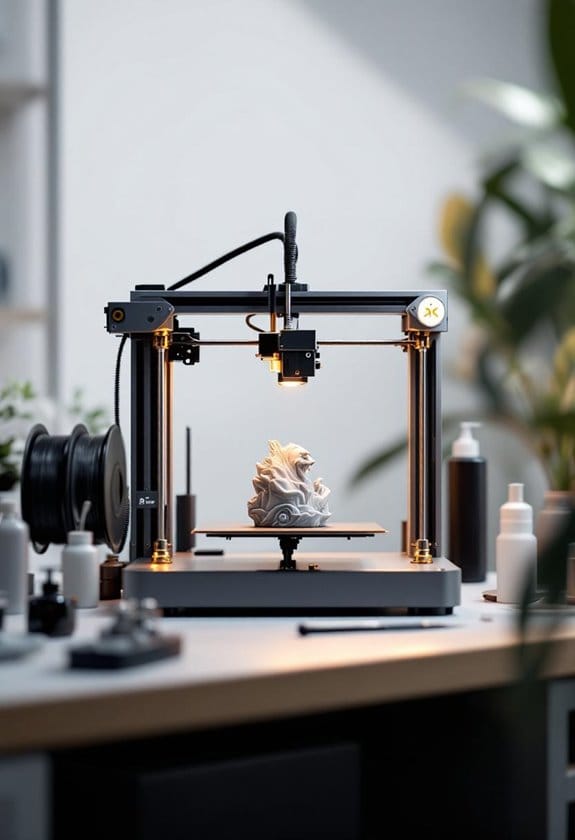
10 Best Bambu Lab P1S Upgrades That Transform Your Prints

You’ve just started a 12-hour print only to hear a gritty clunk and see score marks on the filament where the drive gear chewed it — or you notice a foggy, oily haze building around the printer after a long ABS run.
Those small failures turn hours of work into wasted time and brittle parts. What separates a reliable 3D printer from a flaky one is often overlooked: hardened feed and hotend components for abrasive filaments, proper filament drying and enclosure filtration, and simple maintenance like rail lubrication.
This article lists 10 specific upgrades chosen for durability, ease of install, and measurable print-quality gains; by the end you’ll know which parts to fit and why.
Key Takeaways
If you print abrasive filaments or high-temp materials and worry about nozzle wear, a hardened-steel hotend kit (0.4 mm included) gives you reliable extrusion and lasts far longer than stock nozzles, so you can print more without swapping parts. It keeps your prints consistent at higher temps. Try it if you use carbon-fiber, glow-in-the-dark, or nylon often.
For anyone who’s had slipping or stripped filament, the BIQU Panda Claw hardened brass extruder gear combo improves filament grip and cuts extruder wear by using a tougher bite on the filament, which means fewer jams and cleaner retractions. It’s an easy swap that helps when you feed abrasive or flexible filaments. You’ll notice steadier prints.
What makes this multi-spool system stand out is seamless multi-color and multi-material printing plus active drying, so if you switch spools mid-print or work with moisture-sensitive materials the AMS or SUNLU AMS Heater-enabled system keeps filament dry and changes spools without drama. It’s perfect for painters, prototypers, and anyone doing multi-filament parts. You’ll save time and filament.
You get a controlled environment without complex mods when you add a heated chamber like the BIQU Panda Breath, and that matters if you fight warping on ABS or PC because it stabilizes ambient temps and reduces layer cracks. It helps larger parts print flat and stay bonded between layers. Use it when you need stronger, longer-lasting parts.
Perfect for routine maintenance, this habit of applying high-temp, non-toxic lubricant to rails and lead screws and inspecting belts and pulleys fixes motion issues before they ruin a print, which keeps your CoreXY movement smooth and repeatable. Do it regularly and you’ll avoid layer shifts and weird artifacts. It’s a small effort that pays off.
| Bambu Lab P1S 3D Printer — Multi-Material High-Speed |  | Best Overall | Compatibility Target: Bambu Lab P1S (native printer) | Primary Function: 3D printer (high-speed multi-material printing) | Power / Electrical: Printer-powered (internal electronics; requires mains) | VIEW LATEST PRICE | Read Our Analysis |
| SUNLU AMS Heater Filament Dryer for Bambu Lab | 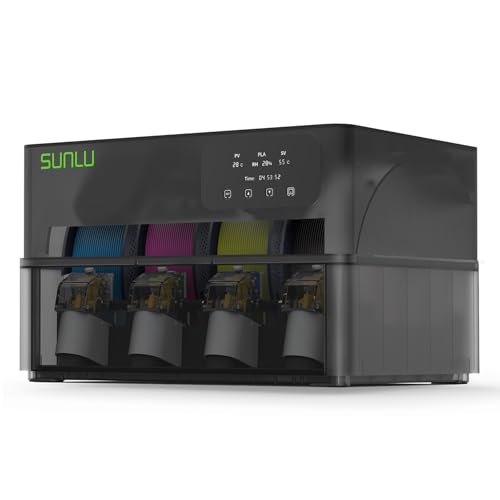 | Best For Continuous Printing | Compatibility Target: Bambu Lab AMS Gen 1 (adds to AMS on P1S) | Primary Function: AMS filament heater / dryer (enables simultaneous drying) | Power / Electrical: Powered (heater with power cord; mains) | VIEW LATEST PRICE | Read Our Analysis |
| BIQU Panda Breath 3‑in‑1 3D Printer Chamber Heater | 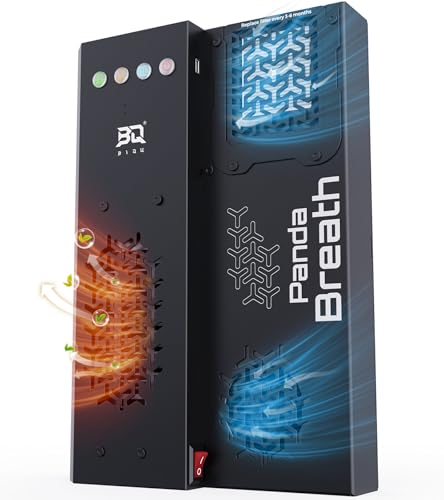 | Best For Engineering Filaments | Compatibility Target: Bambu-Lab P1 / P1S / P1P / X1C / A1 (with enclosure) | Primary Function: Chamber heater + filter + filament dryer | Power / Electrical: 300W PTC heater (mains-powered) | VIEW LATEST PRICE | Read Our Analysis |
| SUNLU PLA+ Multicolor Filament Bundle for 3D Printers | 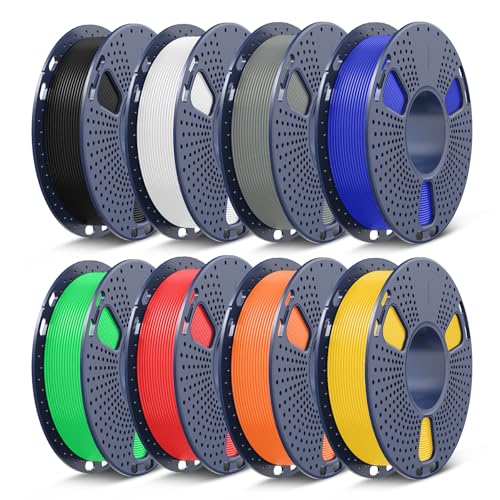 | Best For Color Variety | Compatibility Target: 1.75 mm FDM printers (including Bambu) | Primary Function: Multicolor PLA+ filament bundle (printing consumable) | Power / Electrical: Passive filament (no power) | VIEW LATEST PRICE | Read Our Analysis |
| 3D Printer Lubricant Grease for Bambu Lab & Creality | 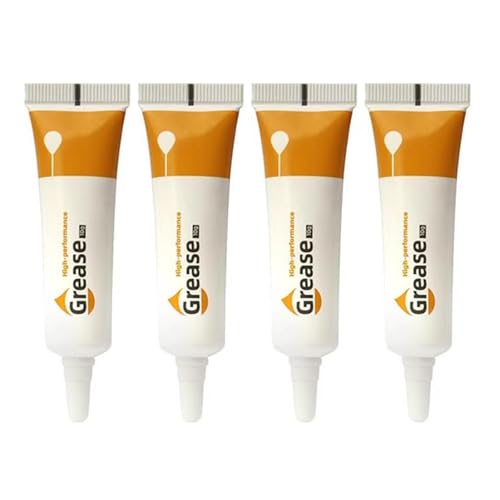 | Best Maintenance Essential | Compatibility Target: Bambu Lab P1S (listed among compatible models) | Primary Function: Lubricant grease (mechanical maintenance) | Power / Electrical: Passive grease (no power) | VIEW LATEST PRICE | Read Our Analysis |
| BIQU Panda Claw Hardened Brass Extruder Gear (Bambu-Lab) |  | Best For Durability | Compatibility Target: Bambu-Lab P1P / P1S / X1C / X1E | Primary Function: Hardened brass extruder gear (mechanical upgrade) | Power / Electrical: Passive mechanical part (no power) | VIEW LATEST PRICE | Read Our Analysis |
| Panda Touch Screen Upgrade for Bambu-Lab 3D Printers | Best For Workflow Control | Compatibility Target: Bambu-Lab P1S / P1P / X1C / X1E / A1 / A1 Mini | Primary Function: Touchscreen control upgrade (UI / farm management) | Power / Electrical: Onboard LiPo battery + USB charging; WiFi (requires occasional charging) | VIEW LATEST PRICE | Read Our Analysis | |
| SUNLU PLA 1.75mm 3D Printer Filament – Black |  | Best Value Filament | Compatibility Target: 1.75 mm FDM printers (broad compatibility including Bambu) | Primary Function: PLA filament spool (printing consumable) | Power / Electrical: Passive filament (no power) | VIEW LATEST PRICE | Read Our Analysis |
| Bambu Lab P1 Series Hardened Steel Hotend Kit |  | Best For Abrasive Filaments | Compatibility Target: Bambu Lab P1 Series (P1P, P1S) | Primary Function: Hardened steel hotend kit (hotend replacement/upgrade) | Power / Electrical: Hotend assembly (powered when installed on printer) | VIEW LATEST PRICE | Read Our Analysis |
| BIQU Panda Lux LED Strip Upgrade Kit for Bambu-Lab | 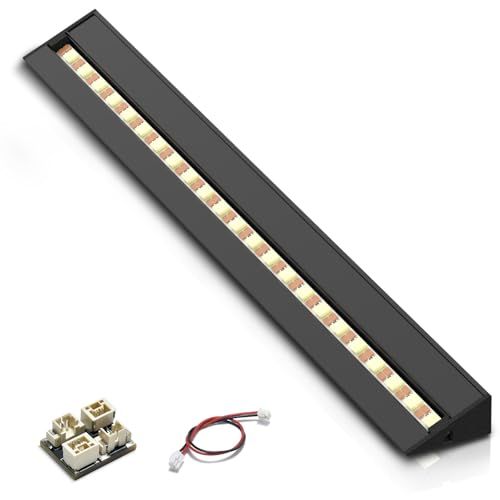 | Best For Visibility | Compatibility Target: Bambu-Lab P1S / P1P / X1C / X1E | Primary Function: LED light strip (illumination upgrade) | Power / Electrical: 5V DC, draws power from printer (0.3 A) | VIEW LATEST PRICE | Read Our Analysis |
More Details on Our Top Picks
Bambu Lab P1S 3D Printer — Multi-Material High-Speed
If you want quick, multi-color prints without constant tinkering, the P1S’s CoreXY motion and enclosed body let you print fast with less wobble and steadier temperatures, so you spend more time designing and less time babysitting. It moves the head faster and with less vibration than old-school setups.
For anyone who needs multiple filament colors or materials in a single job, hooking the P1S up to the Bambu Lab AMS gives you access to up to 16 colors or materials, which is great for prototypes, models, or hobby projects. The AMS adds versatility to your workflow.
What makes this desktop printer stand out for everyday users is the sealed enclosure and automatic bed leveling, which help with first-layer adhesion and keep tricky filaments behaving during longer prints. Those features make prints more consistent.
You get a machine that handles common filaments like PLA, PETG, TPU, PVA, PET ABS, and ASA, with limited support for PA and PC, while you should avoid carbon- or glass-filled polymers. Use it for toys, parts, and display pieces, not for high-abrasion composite prints.
- Compatibility Target:Bambu Lab P1S (native printer)
- Primary Function:3D printer (high-speed multi-material printing)
- Power / Electrical:Printer-powered (internal electronics; requires mains)
- Material / Construction:Plastic housing (printer frame/enclosure)
- Weight / Item Weight:17.7 kg (38.9 pounds)
- Date First Available:August 15, 2026
- Additional Feature:CoreXY high-speed motion
- Additional Feature:Fully enclosed body
- Additional Feature:Up to 16-color support
SUNLU AMS Heater Filament Dryer for Bambu Lab
If you print with multiple spools or work with moisture-sensitive materials, the SUNLU AMS Heater heats your filament while you print so you get fewer failed runs and better surface quality. It replaces the AMS Gen 1 lid in three non-destructive steps, so you don’t touch the feeder and you can switch back anytime. It heats to 70°C in about 20 minutes.
For anyone who wants to run several materials without constant spool swaps, the heater holds up to four spools and directs airflow to the filament to keep it dry during long prints. The design also shields the feeding motor from overheating, which helps your feeder last longer. It’s lightweight and comes with mounting hardware.
What makes this accessory stand out for P1S owners is how easy the swap is and how it works with your existing AMS setup, so you can keep printing without major modifications. It includes a one-year warranty and averages 4.6/5 in user reviews. Simple to install.
- Compatibility Target:Bambu Lab AMS Gen 1 (adds to AMS on P1S)
- Primary Function:AMS filament heater / dryer (enables simultaneous drying)
- Power / Electrical:Powered (heater with power cord; mains)
- Material / Construction:Plastic heater housing / metal components (AMS lid replacement)
- Weight / Item Weight:1.7 kg
- Date First Available:(ASIN listing; date not explicitly provided in summary)
- Additional Feature:Replaces AMS lid
- Additional Feature:Heats to 70°C fast
- Additional Feature:Four-spool drying
BIQU Panda Breath 3‑in‑1 3D Printer Chamber Heater
If you struggle with warped ABS or PC prints, the Panda Breath’s 300W PTC heater keeps the chamber warm and steady so your layers stick together better. That steady heat reduces warping by keeping temperatures even across the build, and it gets up to temperature fast. It’s a real help when you print engineering plastics.
For anyone who stores or pauses filament and worries about moisture, the dryer mode pulls humidity out during idle times and while printing so you won’t get bubbly, weak layers. The unit dries filament without you babysitting it. That saves you time and failed prints.
What makes this 3‑in‑1 chamber accessory stand out is the air treatment: dual HEPA plus activated carbon filters trap fine particles and cut VOCs, which improves air quality around your printer. You’ll notice fewer fumes and less smell during long ABS jobs. It’s especially useful in small rooms.
You get easy control with both a Web UI and buttons, plus automatic start and stop with supported printers so your workflow is smoother. The interface is straightforward whether you like tapping buttons or using a browser. That makes it easier to add to an existing setup.
The BIQU Panda Breath 3‑in‑1 also protects your gear with dual thermal safeguards that switch things off if temperatures go weird. It’s a safety layer you want when running a heated chamber for hours. Peace of mind matters when prints are long.
- Compatibility Target:Bambu-Lab P1 / P1S / P1P / X1C / A1 (with enclosure)
- Primary Function:Chamber heater + filter + filament dryer
- Power / Electrical:300W PTC heater (mains-powered)
- Material / Construction:Metal heater elements, plastic housing, filter media (HEPA + activated carbon)
- Weight / Item Weight:4.85 pounds (≈2.20 kg)
- Date First Available:January 24, 2026
- Additional Feature:300W PTC chamber heater
- Additional Feature:Dual HEPA+carbon filter
- Additional Feature:Web UI + physical control
SUNLU PLA+ Multicolor Filament Bundle for 3D Printers
If you want reliable, colorful prints for everyday projects, this PLA+ bundle gives you eight vibrant colors across 2 kg so you can switch shades without pausing mid-job. The spools are wound neatly to cut down on knots and tangles, which means fewer failed prints and less time untangling filament. Print at 210–235°C and a 55–65°C bed for good layer adhesion.
For anyone who needs stronger parts than standard PLA, PLA+ delivers tougher finishes and brighter hues, helping your prototypes and prints last longer. You get dimensional accuracy of ±0.02 mm so layers line up cleanly and parts fit together better. It’s 1.75 mm diameter, which fits the P1S and most hobby printers.
What makes this filament bundle stand out for casual makers is that it keeps common hassles low — warping, stringing, and clogging are reduced so your workflow stays smooth. Use it for toys, household fixes, and display pieces without constantly tweaking settings. It’s an easy upgrade if you want better-looking prints with less fuss.
- Compatibility Target:1.75 mm FDM printers (including Bambu)
- Primary Function:Multicolor PLA+ filament bundle (printing consumable)
- Power / Electrical:Passive filament (no power)
- Material / Construction:PLA+ (polylactic acid filament)
- Weight / Item Weight:2 kg (total filament weight; package ~4.4 lb)
- Date First Available:August 14, 2026
- Additional Feature:8 vibrant colors
- Additional Feature:±0.02 mm accuracy
- Additional Feature:210–235°C recommended
3D Printer Lubricant Grease for Bambu Lab & Creality
If you hear grinding or feel sticky movement on your printer rails, this grease quiets things and makes motion smoother so your prints run more reliably. It comes as a 4-pack of 10 g tubes that you can stash in your toolbox and use where your printer needs it most. Apply a light smear to guide rails, lead screws, or transmission parts and wipe the excess; reapply now and then to keep parts moving. For anyone who owns a Bambu Lab or Creality printer like the P1S, X1 series, or Ender 3 V3 models, this formula fits those common machines and helps prolong component life. The grease handles temperatures from -20 °C up to 120 °C, so it stays stable during normal printing sessions without running away. You’ll notice less friction noise right away. What makes this 3D printer lubricant stand out is its anti-rust, low-flow recipe that resists drying and migration, so you don’t have to babysit it. The small tubes make targeted application easy and limit waste. You get quieter, smoother movement without complicated maintenance routines or special tools.
- Compatibility Target:Bambu Lab P1S (listed among compatible models)
- Primary Function:Lubricant grease (mechanical maintenance)
- Power / Electrical:Passive grease (no power)
- Material / Construction:Grease (lubricant compound)
- Weight / Item Weight:1.44 ounces (≈0.041 kg)
- Date First Available:December 4, 2023
- Additional Feature:4-pack tubes
- Additional Feature:-20°C to 120°C range
- Additional Feature:Anti-rust, low-flow formula
BIQU Panda Claw Hardened Brass Extruder Gear (Bambu-Lab)
If you’ve been fighting clogged or chewed-up filament when printing abrasive or fiber-filled materials, swapping to harder drive parts fixes that problem by resisting wear and gripping better. The BIQU Panda Claw Hardened Brass Extruder Gear replaces softer internals with a hardened mold steel gear coated in golden RNC Nano and pairs it with a self-lubricating brass reduction gear to cut down on wear and improve filament grip. It handles fibers better and lasts longer.
For anyone who wants quieter, more consistent extrusion, the refined tooth profile smooths filament flow for fewer skips and more even layers. The reduction gear is lightweight with a five-spoke design, which lowers inertia so your extruder positions more precisely. That translates to cleaner prints with fewer artifacts.
What makes this extruder gear stand out for Bambu Lab P1S owners is the combination of hardened gear material and brass reduction gear working together to reduce maintenance. You get higher hardness and wearable resistance without replacing the entire extruder assembly. It’s a practical, relatively simple upgrade for improving long-run print reliability.
- Compatibility Target:Bambu-Lab P1P / P1S / X1C / X1E
- Primary Function:Hardened brass extruder gear (mechanical upgrade)
- Power / Electrical:Passive mechanical part (no power)
- Material / Construction:Hardened mold steel + brass + AL6061-T6 (gear & arm)
- Weight / Item Weight:1.69 ounces (≈0.048 kg)
- Date First Available:August 21, 2026
- Additional Feature:RNC Nano coated steel
- Additional Feature:Brass reduction gear
- Additional Feature:CNC aluminum idler arm
Panda Touch Screen Upgrade for Bambu-Lab 3D Printers
If you run several Bambu-Lab printers and hate switching between screens, the Panda Touch lets one handheld display find and control up to ten printers over your local network so you can manage everything from one place. It gives you a 5-inch IPS touch display that looks like the X1C and plugs into a supplied USB dock, and it connects over 2.4 GHz WiFi for true portable use. Nice and simple.
For anyone who needs to change AMS settings or tweak print jobs on the fly, the Panda Touch handles AMS units, fans, heaters, LEDs, and file printing from TF or USB so you don’t have to walk back to each printer. It also supports OTA firmware updates from BTT, which makes keeping the handheld up to date much easier. Just check firmware compatibility first.
What makes this upgrade stand out for workshop folks is its portable convenience when you’re moving between machines on a busy bench; the single screen saves you time and confusion. Battery life is limited, so bring a charger or plan short sessions. Also note that warranty terms may exclude printer firmware changes, so proceed carefully if you tweak printer software.
- Compatibility Target:Bambu-Lab P1S / P1P / X1C / X1E / A1 / A1 Mini
- Primary Function:Touchscreen control upgrade (UI / farm management)
- Power / Electrical:Onboard LiPo battery + USB charging; WiFi (requires occasional charging)
- Material / Construction:Plastic touchscreen enclosure + electronic components (IPS display, LiPo)
- Weight / Item Weight:11.3 ounces (≈0.32 kg)
- Date First Available:November 23, 2026
- Additional Feature:5″ IPS touchscreen
- Additional Feature:Wireless 2.4 GHz control
- Additional Feature:Battery-powered portable dock
SUNLU PLA 1.75mm 3D Printer Filament – Black
If you push your Bambu Lab P1S for faster prints or finer detail, SUNLU’s 1.75 mm PLA keeps your extruder feeding smoothly with tight ±0.02 mm diameter tolerance that cuts down on weird layer gaps and blobs. It winds neatly on the spool so you won’t deal with tangles mid-print.
For anyone who swaps spools often and needs compatibility, the 22 mm hub fits many filament holders and makes switching quick and painless. Print at 200–230°C and you’ll get reliable layer bonding, with a heated bed around 50–65°C helping parts stick better.
What makes this PLA stand out for everyday users is that it balances user-friendly handling with precise specs, so you get consistent extrusion without fiddly setup. Try speeds of 50–100 mm/s for a good surface finish and solid adhesion.
- Compatibility Target:1.75 mm FDM printers (broad compatibility including Bambu)
- Primary Function:PLA filament spool (printing consumable)
- Power / Electrical:Passive filament (no power)
- Material / Construction:PLA (polylactic acid filament)
- Weight / Item Weight:1 kg (2.21 pounds)
- Date First Available:(date not explicitly provided in summary)
- Additional Feature:1 kg spool size
- Additional Feature:Neat 100% winding
- Additional Feature:200–230°C nozzle range
Bambu Lab P1 Series Hardened Steel Hotend Kit
If you print a lot with abrasive filaments and your nozzles wear out too fast, the hardened steel construction reduces wear so you get longer nozzle life. The kit gives you a full hotend assembly including a fused 0.4 mm nozzle and a fine metal heat tube that helps transfer heat more evenly for cleaner extrusion. It also includes a ceramic heater rated to 300°C and a precise thermistor so you can run hotter filaments without guessing. For anyone who wants fewer clog headaches and simpler swaps, the integrated terminal module and cooling fan make the setup more reliable. The P1 Series Hardened Steel Hotend Kit solves nozzle-wear problems by using a hardened steel nozzle and parts that stand up to filled materials, so you can print abrasive blends with less maintenance. Perfect for hobbyists and small-business makers who need tougher components, this kit gives you higher abrasion resistance and the parts to handle higher temps. You get reliable high-temperature performance without constantly changing nozzles.
- Compatibility Target:Bambu Lab P1 Series (P1P, P1S)
- Primary Function:Hardened steel hotend kit (hotend replacement/upgrade)
- Power / Electrical:Hotend assembly (powered when installed on printer)
- Material / Construction:Hardened steel hotend, ceramic heater, metal heatsink
- Weight / Item Weight:1.44 ounces (≈0.041 kg)
- Date First Available:November 13, 2026
- Additional Feature:Integrated fused nozzle
- Additional Feature:Ceramic heater to 300°C
- Additional Feature:Hardened steel construction
BIQU Panda Lux LED Strip Upgrade Kit for Bambu-Lab
If you struggle to spot print defects under dim or inconsistent lighting, the BIQU Panda Lux LED strip delivers much clearer, more consistent light so you can inspect prints sooner. It draws 5V at 0.3A from your Bambu-Lab printer’s stock light bar connector, so you don’t need extra wiring or a power adapter. For anyone who wants a simple install without glue or screws, the magnetic mount fits behind the front panel and holds tight during moves. The aluminum housing keeps the 31 cool-white LEDs (6000K) running cooler and extends life to about 36,000 hours. What makes this LED strip stand out for P1S, P1P, X1C, and X1E owners is that the controls work through Bambu Studio and the printer screen, so you can adjust lighting the way you already do. You get brighter, more consistent illumination without changing your workflow. Perfect for hobbyists and pros who check prints frequently, this upgrade helps reveal early defects and improves photo quality under the camera. The install is straightforward and reversible.
- Compatibility Target:Bambu-Lab P1S / P1P / X1C / X1E
- Primary Function:LED light strip (illumination upgrade)
- Power / Electrical:5V DC, draws power from printer (0.3 A)
- Material / Construction:Aluminum alloy housing + LED strip components
- Weight / Item Weight:3.84 ounces (≈0.109 kg)
- Date First Available:November 23, 2026
- Additional Feature:Magnetic tool-free mount
- Additional Feature:Cool white 6000K LEDs
- Additional Feature:31-LED aluminum bar
Factors to Consider When Choosing Bambu Lab p1s
If you want faster prints without major quality tradeoffs, higher acceleration and speed settings will cut your print time but will need careful tuning of jerk and acceleration to keep surfaces clean. Tweak settings gradually and test small parts.
For anyone who prints large or heat-sensitive parts, consider build volume and whether the printer has an enclosure, because a bigger, enclosed space lets you print larger ABS or nylon parts with fewer warps. That also lets you run higher-temperature filaments more consistently.
What makes this upgrade choice smart for multicolor or multi-material projects is compatibility with multi-material systems, since they let you mix colors and materials in a single run and expand what you can make. They can add complexity though, so expect some extra setup and calibration.
You get wider filament support when the machine handles PLA, PETG, ABS, and specialty filaments, which means you can pick the right material for strength, flexibility, or heat resistance. Try a few rolls to see how the feed and temperature control behave.
The P1S and its upgrades should be judged on reliability and maintenance because a stable machine with easy access to parts and clear service steps will cut downtime and save you headaches. Keep a spare nozzle and plan for routine maintenance to keep prints consistent.
Print Speed And Acceleration
If you want faster prints but worry about quality, lower speeds for perimeters and higher speeds for infill help you hit a sweet spot without wrecking surface finish. Higher top travel speeds cut print time, but they can bring ringing or loss of dimensional accuracy if your P1S motion system and frame aren’t up to it. Go slower on perimeters.
For anyone who prints flexible or tall parts and sees blobs or poor layer bonding, reducing both speed and acceleration steadies extrusion and improves adhesion. Acceleration limits control how quickly the head reaches speed and higher values shorten short-segment moves while increasing the risk of layer shifts or skipped steps without proper motor tuning and cooling. Try modest increases carefully.
What makes this advice practical for most hobbyists is that you can use slicer speed presets and acceleration multipliers to balance quality and speed without changing hardware. You should weigh top travel speed against achievable surface quality, because very high speeds often need tuned jerk or s‑curve motion profiles and stiffer belts or rails. Test with small changes.
You get safer prints and less frustration by keeping perimeters slow for quality while running infill and noncritical moves faster, which saves time without sacrificing look. For printers with weaker frames, keep acceleration conservative and tune motor currents and cooling first. Make incremental adjustments.
Build Volume And Enclosure
If you need to print big functional parts without surprises, measure the printer’s internal dimensions first so your models actually fit and don’t split at the seams. For large assemblies that join after printing, those extra seams mean more cleanup and more weak spots, so pick a build volume that leaves room to spare. Check that before you buy.
For anyone who prints ABS, ASA, PC, or PA and hates warping, a full enclosure that stabilizes chamber temperature will make your parts stick together better and reduce layer separation. Active chamber heating and steady airflow keep the heat steady during long or slow‑cooling prints, which helps prevent cracking between layers. It matters more than you might think.
What makes this setup stand out for everyday use is ventilation that manages fumes during long runs, because you don’t want VOCs in your workspace or your lungs. Look for enclosures with filtered vents or VOC control so you can keep printing indoors without worrying about smell or emissions. That’s an easy safety win.
You get easy maintenance without losing the thermal seal by choosing a design that still lets you level the bed, swap filament, and reach components. A solid thermal seal matters for consistent first layers, but not at the cost of frustrating fiddly access. Keep both in mind when comparing models.
Multi‑Material Compatibility
If you need to print things with multiple materials or colors, check how many different filaments the P1S can handle so you don’t get stuck swapping mid‑print. For anyone who wants flexible or water‑soluble parts, make sure the machine supports those filament types because some feeders jam on soft or wet materials. What makes this printer stand out is whether its extruders are independent or share a drive path, since that affects retraction tuning, swap speed, and how much oozing you’ll have to manage. You get automated filament handling like dry feeding, spool management, or active drying to cut moisture and jam risks without adding constant babysitting. The P1S helps if you run complex prints that need many slots or high feeding throughput; match slot count and feed speed to your projects so you avoid frequent manual swaps. Perfect for hobbyists and small‑shop users, this advice keeps your prints reliable and your workflow smoother.
Filament Support Range
If you like swapping filaments often and hate jams, check the supported filament diameters first because the P1S usually uses 1.75 mm with tight ±0.02 mm tolerances, which keeps feeding smooth. That tolerance matters when you buy cheaper spools that vary in diameter by a few hundredths of a millimeter, and matching that spec will cut down on clogs and skipped steps. Short and simple.
For anyone who prints everything from desk toys to functional parts, look at the material families the machine handles since you want PLA and PETG to be trouble-free and TPU to print without nasty stringing. It also lists PVA for water-soluble support and ABS/ASA for parts that need heat resistance, and you should check whether it actually reaches and holds the temps those plastics need. Quick check.
What makes this 3D printer stand out for hobbyists who try tougher materials is knowing whether it reliably prints PC and nylon (PA), because those require higher nozzle and bed temps and some enclosure control. See if the hotend and extruder tolerate abrasive or filled filaments; carbon- or glass-filled mixes wear parts faster and need hardened paths or nozzles. Keep an eye on that.
You get easier multi-color or multi-material work without painful swaps if the printer is AMS-compatible and has drying or storage options, since wet filament ruins prints and switching spools is annoying. The AMS makes swapping seamless, and dryers or enclosed, ventilated storage will keep material dry for flexible or hygroscopic filaments. Handy feature.
The P1S solves warping and adhesion headaches by pairing bed heating with an enclosure when you print ABS, ASA, or other high-temp plastics, so your larger prints don’t lift at the corners. Make sure the bed temperature range and enclosure performance match the materials you plan to use, because that’s what prevents layer separation and failed prints. Worth checking.
Reliability And Maintenance
If you want prints that don’t fail because of sloppy motion, lubricating the rails and lead screws with high-temperature, non-toxic grease keeps CoreXY motion smooth and cuts down bearing wear. Use automatic bed leveling so your first layers are consistent, and check its calibration now and then. Do that.
For anyone who fights nozzle clogs and uneven extrusion, inspect and clean the hotend and nozzle regularly and swap in a new nozzle when the old one hardens or wears out. This keeps your extrusion accurate and saves you time on failed prints. Simple maintenance.
What makes this 3D-printing routine useful for hobbyists and small shops is proper filament care: store hygroscopic materials in sealed containers or use an active dryer and dry them before printing. Also watch your printing temperatures for steady readings so filament behaves predictably. It helps a lot.
You get fewer layer shifts without constant worry by scheduling checks of belts, pulleys, and electrical connectors for correct tension, wear, and secure seating. Tight belts and seated connectors mean you won’t lose prints to slips or intermittent power. Do that regularly.
Upgradability And Accessories
If you want a printer that grows with your projects, check the mechanical and electronic interfaces first: the hotend mount, extruder drive, and control board headers tell you if hardened hotends, alternative extruders, or touchscreen controllers will fit. Those interfaces also show how easy upgrades will be when you need better materials or faster prints. Look closely.
For anyone who plans to print multi‑material parts or experiment with flexible filaments, verify expansion capacity like mounting space, filament routing paths, and extra filament slots or ports so adding a second feed or MMU kit won’t be a hassle. Think about how you’ll route filaments before you buy to avoid ugly external guides later. Measure where the spools sit.
What makes this kind of machine useful over time is the firmware and connectivity, so make sure it supports OTA updates, LAN/Wi‑Fi, and open firmware so you can run custom interfaces or farm tools. Open firmware means you can tweak features and add community plugins for things you actually need. You’ll thank yourself later.
You get room to add accessories without swapping the whole frame when the design has space for modules like filtration or lighting and good maintenance access, which helps when you change parts or clean fans. Look for designs that use standard parts so replacements are cheap and easy to find. That keeps your printer working longer.
Safety And Thermal Control
If you worry about heater failures or runaway temps, check that the P1S has hardware and firmware thermal protection that cuts heaters when readings go wrong, because that protects your home and parts. The printer also keeps your hotend safe with stable thermistor readings for accurate control, and that matters if you’re printing long jobs. Watch temperatures.
For anyone who wants to print engineering filaments, make sure the hotend can reach around 300°C and the bed holds typical PLA and ABS ranges so you can use tougher materials. Use an enclosed chamber and active chamber heating when you need higher internal temps, since that keeps prints from warping and improves layer adhesion. Monitor chamber limits.
What makes this printer helpful for everyday users is that ventilation options—HEPA or activated carbon filters or an external exhaust—lower VOCs and particles so you aren’t breathing fumes while printing. Keep fans and motors clear and cooled, because moving parts run longer and hotter during big prints. Check your wiring.
You get safety updates without extra hassle by updating the firmware for safety patches, which fixes thermal and control issues over time. Maintain proper electrical installation to avoid shorts and stress on components, and that keeps the system running. Take care.
Frequently Asked Questions
Can I Upgrade the P1S for Food-Safe Printing?
If you want to make safe food items like cookie cutters or molds, pick a certified food-safe filament first and foremost, because that’s the material that touches your food. You’ll also want a stainless steel nozzle or a proven inert hardened nozzle so metal particles won’t leach into what you print, and yes, those nozzles last longer with abrasive filaments too. Test one piece like you would a new pan by washing and sterilizing it before use.
For anyone who cares about cleaning and reuse, get a removable, cleanable build surface that you can take off and sanitize easily; porous beds trap residue and are harder to keep sanitary. Avoid porous print designs and materials since tiny crevices harbor bacteria even after rinsing. Consider sealing porous prints with FDA-compliant sealants if the item will touch food directly, because a smooth, sealed surface is much easier to clean.
What makes this upgrade practical for home use is that you can validate safety with simple chemical resistance checks and by documenting your cleaning routine and how long you’ll use each part before replacing it, so you don’t have to guess. Keep a log of cleaning steps and limits for each printed item. Test periodically and replace parts that show wear.
How Do Upgrades Affect Printer Warranty?
If you want to tweak your printer to get better prints or faster speeds, check the manufacturer’s warranty terms first because upgrades that change hardware or use unofficial firmware can void coverage. For anyone who still worries about defects, most warranties will cover manufacturing faults, but damage caused by third-party parts or user mods is often excluded and can shift responsibility to you. What makes this situation easy to handle is documenting any changes and keeping original parts; keep receipts and take photos. You get clearer options when you contact support before big upgrades, so ask about service implications and whether they’ll still repair your unit after modifications. Perfect for cautious DIYers, this approach helps you protect your investment while letting you improve performance.
Which Upgrades Need Firmware Changes?
If you want to swap core electronics and keep your printer usable, know that new mainboards and stepper drivers usually require firmware changes because the firmware maps pins and drivers to motion control. For anyone who’s adding sensors like filament runout switches or different thermistors, update your firmware so temperatures and safety triggers read correctly; this helps you avoid failed prints and flaky readings. What makes this upgrade friendly for hobbyists is that changing an extruder, hotend, or heated bed often needs firmware tweaks too when the thermistor type or PID behavior differs, so don’t assume plug-and-play. You get clearer control without guessing, and that means editing temperature profiles and motor settings if you swap hardware. The printer’s frame and cosmetic mods seldom need firmware edits, so you can focus on looks or rigidity without touching code. Perfect for casual tinkerers, check the manufacturer’s guide before starting—some upgrades are simple, others require a careful firmware flash.
Can I Revert Upgrades to Stock Easily?
If you want to go back to stock after tinkering with your printer, mechanical swaps are the easiest fixes because you just reinstall the original parts and you’re done. For things like nozzles, belts, or fans, keep the originals in a labeled box so you can swap them back quickly.
For anyone who upgraded electronics or firmware but now needs the factory setup, take a careful approach because mismatched firmware can brick your printer; back up your current settings first, find the official stock firmware from the maker, and follow the vendor’s flash steps precisely. Don’t rush.
What makes this situation easier is keeping original screws, connectors, and documentation when you upgrade, since having those parts on hand saves you time and guesswork later. You’ll thank yourself.
Are Any Upgrades Compatible With Other Bambu Models?
If you want to upgrade parts across Bambu models without surprises, check fit and firmware first so you don’t get stuck mid-print. For anyone who swaps parts to save money or add features, fans, nozzles, and filament sensors often fit between models, but custom toolheads and mainboards usually won’t. What makes this clearer for you is that connectors and mounting points differ, so compare physical dimensions and plug types before buying. You get peace of mind by reading manufacturer specs, community test reports, and firmware changelogs, which show real-world compatibility and gotchas. The Bambu community tests often reveal which parts cross-fit and which need adapters or firmware tweaks. Perfect for casual upgraders, back up your settings before installing a new component so you can revert quickly if a change causes errors or needs different calibrations.