As an Amazon Associate, we earn from qualifying purchases. Some links on this site are affiliate links at no extra cost to you. Our recommendations are based on thorough research and editorial judgment.

10 Best Filament Dryers That Keep Your Prints Perfectly Moisture-Free

You’ve just watched a fresh print warp as the filament snapped mid‑layer, the dreaded “popping” sound echoing from the printer while you stare at a ruined batch. The culprit? Moisture lurking in the spool, turning your hobby into a costly trial‑and‑error session.
What truly separates a reliable filament dryer from a flimsy one is how fast it reaches the material’s sweet spot, whether it spreads warm air uniformly, and if it actually monitors humidity instead of just heating. Too many buyers settle for units that take over half an hour to warm up, lack 360° airflow, or ignore moisture re‑absorption, ending up with uneven drying and persistent clogs.
This guide reviews the ten best filament dryers, selected based on heating speed (under 20 minutes to 70 °C), full‑circle airflow, PTC heater stability, sealed chambers, and clear LCD readouts.
By the end, you’ll know which models deliver consistent, moisture‑free filament and how to match them to your printing workflow.
Key Takeaways
If you’re tired of brittle prints caused by humidity, pick a dryer that lets you dial in a wide temperature range of 40‑80 °C and gives you precise control so each filament dries at its sweet spot. For anyone who wants consistent results, a model with 360° heating and built‑in fans spreads warmth evenly, cutting out hot‑spot issues. You get uniform drying without guessing. Opt for a unit that can handle multiple spools—four‑spool or dual‑chamber designs let you keep all your materials ready at once. What makes this kind of dryer stand out is the integrated humidity sensor paired with automatic shut‑off, so you never have to watch the moisture level manually. You get peace of mind without extra effort. Consider power efficiency and warm‑up speed; PTC heaters (120‑200 W) hit the setpoint in 15‑20 minutes, saving both time and electricity. Perfect for busy makers, this quick‑heat feature means you can start printing sooner.
| SUNLU AMS Heater – 70°C Fast Heating 4‑Spool Filament Dryer | 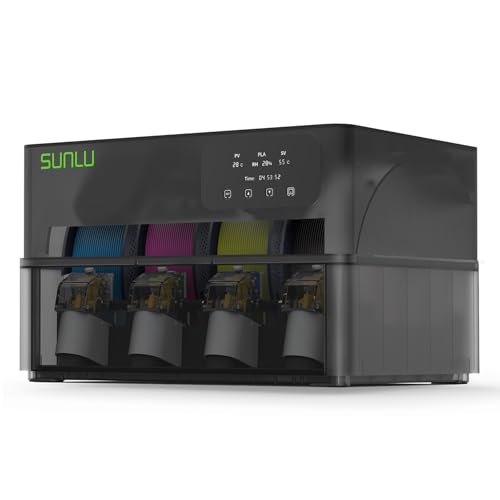 | Best Overall | Temperature Range: up to 70 °C | Capacity (Spool Count): 4 spools | Power Source: AC mains (included cord) | VIEW LATEST PRICE | Read Our Analysis |
| Kingroon 1KG 360° Filament Dryer Box | 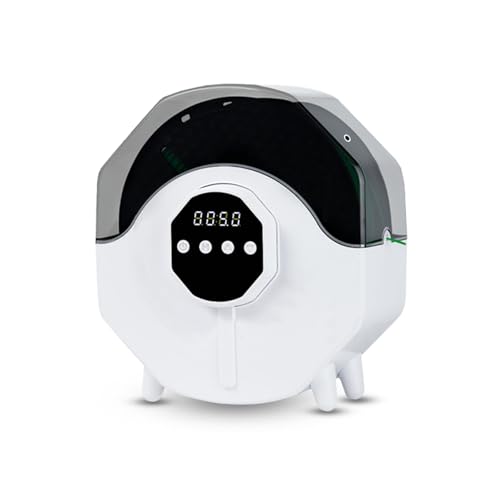 | Budget-Friendly Pick | Temperature Range: 50 °C–70 °C | Capacity (Spool Count): 1 kg (≈1–2 spools) | Power Source: AC mains (plug) | VIEW LATEST PRICE | Read Our Analysis |
| 3D Printer Filament Dryer & Active Feeder Portable Silent Warmer | 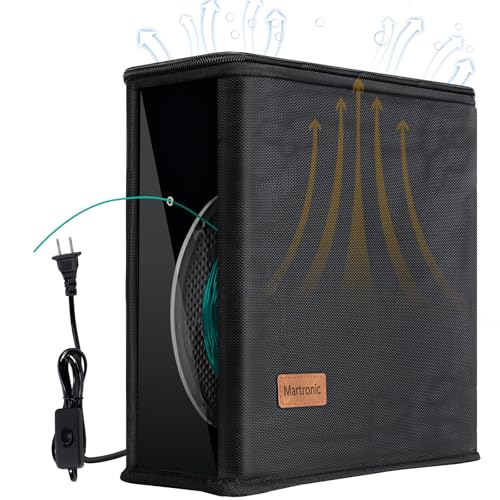 | Compact Pro | Temperature Range: 25 W graphene core (no explicit range, but designed for PLA/PETG) | Capacity (Spool Count): 1 spool (active feeder) | Power Source: AC mains (plug) | VIEW LATEST PRICE | Read Our Analysis |
| Chitu Systems E1 Filament Dryer with 2 Chambers | 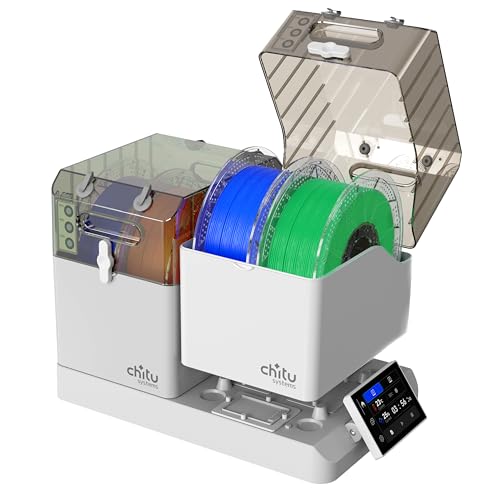 | Multi-Chamber Master | Temperature Range: up to 120 °C (dual 120 W PTC heaters) | Capacity (Spool Count): 4 spools (8 holes) | Power Source: AC mains (plug) | VIEW LATEST PRICE | Read Our Analysis |
| Comgrow 3D Filament Dryer Box with Spool Holder |  | Simple Starter | Temperature Range: 40 °C–50 °C | Capacity (Spool Count): 2 kg (2 spools) | Power Source: AC mains (plug) | VIEW LATEST PRICE | Read Our Analysis |
| SUNLU Filament Dryer Box S1 Plus (Black) |  | Fast Dryer | Temperature Range: 35 °C–55 °C | Capacity (Spool Count): 1 kg (≈1–2 spools) | Power Source: AC mains (plug) | VIEW LATEST PRICE | Read Our Analysis |
| Anycubic ACE Pro Filament Dryer Box for Kobra 3 Max | 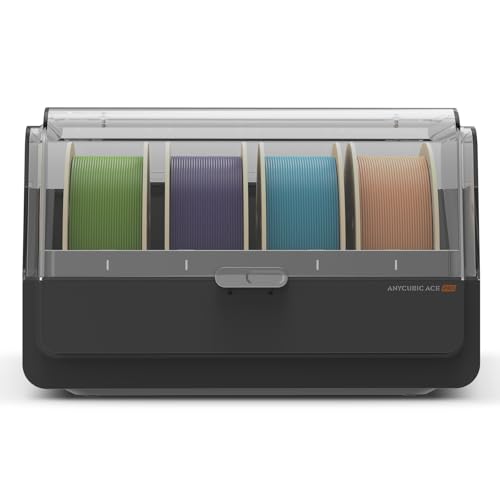 | Color-Print Specialist | Temperature Range: 131 °F (≈55 °C) | Capacity (Spool Count): 1 spool (per unit) | Power Source: AC mains (plug) | VIEW LATEST PRICE | Read Our Analysis |
| Creality Filament Dryer Box Pro – 360° Heating & Storage | 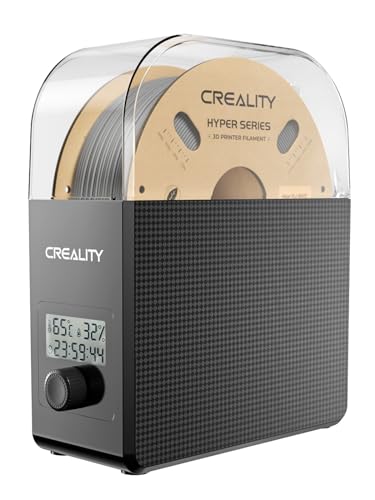 | Premium Performer | Temperature Range: 45 °C–65 °C | Capacity (Spool Count): 2 spools (typical) | Power Source: AC mains (plug) | VIEW LATEST PRICE | Read Our Analysis |
| Creality Filament Dryer 4‑Spool Dual‑Heating Storage Box | High-Capacity Pro | Temperature Range: up to 75 °C | Capacity (Spool Count): 4 spools | Power Source: AC mains (plug) | VIEW LATEST PRICE | Read Our Analysis | |
| EIBOS 3D Filament Dryer with Fan and Spool Holder | 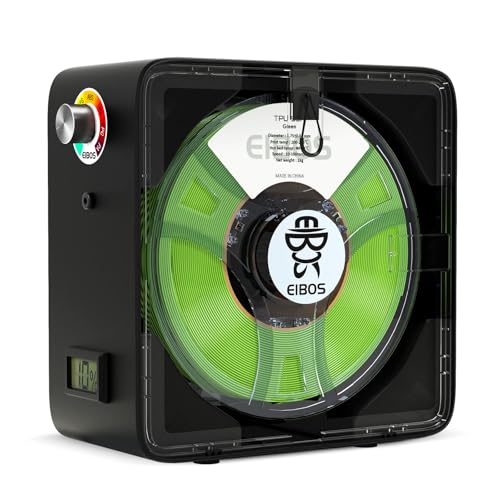 | All‑Rounder | Temperature Range: 40 °C–65 °C | Capacity (Spool Count): 1 spool | Power Source: AC mains (110–120 V plug) | VIEW LATEST PRICE | Read Our Analysis |
More Details on Our Top Picks
SUNLU AMS Heater – 70°C Fast Heating 4‑Spool Filament Dryer
If you’re juggling prints while your filament sits wet, the SUNLU AMS Heater lets you dry on the fly. It hits 70 °C in about twenty minutes, so you can start drying the moment it powers up, and it stays steady for all four spools you load. The heater replaces the original AMS lid in three simple steps, using a hex screwdriver and the screws that come in the box. Its airflow channel pushes warm air right onto the filament while keeping the feeding motor safe from heat. Users give it a 4.6‑star average rating, and a one‑year warranty covers any manufacturing defects. You’ll cut downtime and see better print quality.
- Temperature Range:up to 70 °C
- Capacity (Spool Count):4 spools
- Power Source:AC mains (included cord)
- Control Interface:None (fixed 70 °C)
- Material Compatibility:All AMS‑compatible filaments (PLA, ABS, PETG, TPU, etc.)
- Warranty / Support:1‑year warranty
- Additional Feature:Replaces AMS lid directly
- Additional Feature:Non‑destructive installation
- Additional Feature:Protects feeding motor
Kingroon 1KG 360° Filament Dryer Box
If you keep getting stringy prints because your filament absorbs moisture, the 360° heating in this dryer spreads warmth evenly around the whole spool, so you won’t waste time battling clogs or poor layer adhesion.
For anyone who prints a lot, the sealed, translucent cover lets you watch the drying process while keeping dust out, and the wet‑gas vent pulls humid air away, cutting the chance of condensation on the filament.
What makes this dryer stand out is the three temperature settings—50 °C, 60 °C, and 70 °C—so you can match the ideal range for PLA, ABS, PETG, TPU, or even engineered filaments like ePA‑CF.
You get up to 24 hours of precise timing, and the multiple outlets let you feed filament directly to the printer, meaning you can dry while you print without stopping your workflow.
Perfect for hobbyists who need flexibility, the unit handles spools up to 1 kg, weighs only 2.2 pounds, and comes with a one‑year warranty plus a 30‑day return guarantee for peace of mind.
- Temperature Range:50 °C–70 °C
- Capacity (Spool Count):1 kg (≈1–2 spools)
- Power Source:AC mains (plug)
- Control Interface:Adjustable timer & temperature knobs
- Material Compatibility:PLA, ABS, PETG, TPU, ePA‑CF, ePA‑GF, PC
- Warranty / Support:1‑year warranty
- Additional Feature:360° surround heating
- Additional Feature:Adjustable 0–24 h timer
- Additional Feature:Wet‑gas vent for printing
3D Printer Filament Dryer & Active Feeder Portable Silent Warmer
If you spend hours printing tall, detailed models and keep fighting filament moisture, this dryer keeps your PLA, PETG, or TPU dry while it feeds. The collapsible spool holder fits snugly and the carbon‑fiber graphene core spreads heat evenly, so you avoid hot spots that cause uneven drying. It draws only 25 W, keeping your electricity bill low while maintaining a safe temperature zone that cuts popping and stringing. Polished brass ports let even abrasive carbon‑fiber blends glide smoothly, and a breathable fabric vent expels moisture‑laden air. You can plug it in, flip the ON/OFF switch, and use the dual ports for two spools at once. The unit folds flat for storage and weighs just 1.32 lb, making it portable and silent for travel or a small workshop. It comes with a one‑year warranty, so you can print confidently.
- Temperature Range:25 W graphene core (no explicit range, but designed for PLA/PETG)
- Capacity (Spool Count):1 spool (active feeder)
- Power Source:AC mains (plug)
- Control Interface:On/off switch, dual ports
- Material Compatibility:PLA, PETG, TPU (abrasive filaments supported)
- Warranty / Support:1‑year warranty
- Additional Feature:Carbon‑graphene heating core
- Additional Feature:Breathable fabric vent
- Additional Feature:Polished brass feed ports
Chitu Systems E1 Filament Dryer with 2 Chambers
If you juggle several 3‑D printers and worry about filament getting soggy, the two removable chambers let you dry different materials at the same time. You can set one chamber to 45 °C for PLA while the other runs at 80 °C for nylon, so you never have to wait for one job to finish before starting another. The unit holds four 1.75 mm spools in PTFE‑lined holes, keeping each filament sealed and dry.
For anyone who wants a hands‑off solution, the built‑in humidity sensor watches the moisture level and automatically turns the heater on when it hits 50 %. You’ll never have to guess if the filament is ready; the dryer does the monitoring for you. The dual 120 W PTC heaters and 360° fan system circulate hot air evenly, preventing hot spots that could damage the material.
What makes this filament dryer stand out is the 4‑inch LCD touch screen that lets you pick preset profiles for PLA, ABS, PETG, TPU, nylon, or PC, or fine‑tune temperature and time yourself. You get precise control without fiddling with knobs or external apps. The compact 7.7 lb design fits neatly on a workbench and doubles as a storage box, keeping spools sealed when you’re not drying them.
You get reliable drying without sacrificing desk space, thanks to the dual‑chamber layout and integrated humidity sensor. The device comes with a 30‑day Amazon return guarantee and a manufacturer’s warranty, so you can try it risk‑free.
- Temperature Range:up to 120 °C (dual 120 W PTC heaters)
- Capacity (Spool Count):4 spools (8 holes)
- Power Source:AC mains (plug)
- Control Interface:4‑inch LCD touch screen
- Material Compatibility:PLA, ABS, PETG, TPU, PA, PC
- Warranty / Support:Manufacturer warranty (unspecified)
- Additional Feature:Dual independent chambers
- Additional Feature:Real‑time humidity sensor
- Additional Feature:4‑inch touch LCD screen
Comgrow 3D Filament Dryer Box with Spool Holder
If you struggle with filament moisture causing brittle prints, the sealed, temperature‑controlled chamber keeps your PLA, ABS, or silk‑type filaments dry. You can fit two 1 kg spools at once, and the 2‑inch LCD lets you set the temperature between 40 °C and 50 °C with a simple touch. Choose a drying cycle from six to twelve hours, and the box monitors humidity and temperature in real time.
For anyone who wants hassle‑free operation, the unit automatically powers down after three minutes if the door opens, protecting the electronics. A silicone‑sheath PTFE tube guides the filament out smoothly, while the snap‑button lid and sealing hole lock moisture out during storage.
What makes this dryer stand out is the transparent housing that lets you watch the spools while they dry. The counter‑clockwise feed direction reduces tangles, helping you maintain consistent extrusion and avoid clogs. If you see error codes E0 or E1, just check the motherboard cables for a loose connection before calling support.
You get reliable drying without constant supervision. The design is simple, sturdy, and perfect for anyone who wants steady, clog‑free prints.
- Temperature Range:40 °C–50 °C
- Capacity (Spool Count):2 kg (2 spools)
- Power Source:AC mains (plug)
- Control Interface:2‑inch LCD with touch buttons
- Material Compatibility:PLA, ABS, silk‑type filaments
- Warranty / Support:Vendor warranty (unspecified)
- Additional Feature:Snap‑button sealing lid
- Additional Feature:Silicone PTFE outlet tube
- Additional Feature:Counter‑clockwise filament routing
SUNLU Filament Dryer Box S1 Plus (Black)
If you struggle with filament that constantly sags or makes your prints look rough, the built‑in fan and adjustable temperature (35 °C–55 °C) dry moisture fast so you can print smoother layers. For anyone who prints with PLA, PETG, ABS, TPU, or Nylon, this dryer removes the water that causes stringing and weak adhesion. You can fit up to three spools—1.75 mm, 2.85 mm, or 3.00 mm—inside the compact PETG shell, which measures 210 × 89 mm and sits easily on most worktables. The 2‑inch LCD shows temperature, time, and humidity at a glance. Two buttons let you set drying time and temperature in seconds. The fan speeds up evaporation, cutting clogs and improving layer bonding. You get consistent results even when ambient humidity spikes. Perfect for hobbyists who need a reliable, low‑maintenance solution, this box weighs only 1.2 kg and looks sleek in black. The design is sturdy enough for daily use without taking up much space. Your workflow stays smooth, and you’ll notice fewer print failures.
- Temperature Range:35 °C–55 °C
- Capacity (Spool Count):1 kg (≈1–2 spools)
- Power Source:AC mains (plug)
- Control Interface:Buttons + 2‑inch LCD
- Material Compatibility:PLA, PETG, ABS, TPU, Nylon (PA)
- Warranty / Support:Manufacturer warranty (unspecified)
- Additional Feature:PETG construction
- Additional Feature:2‑inch LCD display
- Additional Feature:Fast‑fan moisture removal
Anycubic ACE Pro Filament Dryer Box for Kobra 3 Max
If you’re tired of prints that curl because filament absorbs moisture, the ACE Pro’s dual‑PTC heating system delivers steady 200 W power to keep your material at a steady 131 °F. Warm air circulates evenly, so you won’t see bubbles or stringing in your models. You’ll notice smoother layers right away.
For anyone who runs multi‑color projects, the dryer feeds filament through four separate tubes, which cuts tangling and makes color changes painless. One unit can handle four colors, and two units pair with the 8‑Color Filament Hub for eight‑color prints. Switch colors without stopping the job.
What makes this dryer stand out is the built‑in buffer that watches nozzle flow and pauses the print if a clog appears, protecting your printer and keeping the job stable. You get that extra safety net without extra hassle. It’s a quiet, compact box—5 × 5 × 5 inches and 8.8 lb—so it fits neatly on your desk.
You get reliable moisture control without sacrificing space, and the unit ships with a three‑month warranty plus 24/7 support. It works only with the Kobra 3 Max and its Color Engine, so make sure that’s your printer before buying. Enjoy consistent, high‑quality prints every time.
- Temperature Range:131 °F (≈55 °C)
- Capacity (Spool Count):1 spool (per unit)
- Power Source:AC mains (plug)
- Control Interface:Built‑in buffer, temperature control (PTC)
- Material Compatibility:PLA, ABS, PETG, TPU, PA, PC (Kobra 3 Max)
- Warranty / Support:3‑month warranty
- Additional Feature:Dual‑tube color feeding
- Additional Feature:Built‑in clog detection
- Additional Feature:200 W PTC heating
Creality Filament Dryer Box Pro – 360° Heating & Storage
If you keep battling filament that swells after a rainy day, the Creality Dryer Box Pro gives you a dry, ready‑to‑print spool every time. Its compact 9.33 × 3.9 × 10.47 inch frame fits on a busy desk, and the 2.65 lb weight means you can move it without a hassle. The 360° hot‑air fan spreads warmth evenly, hitting 65 °C in about fifteen minutes, while you set the temperature between 45 °C and 65 °C for up to twenty‑four hours. Real‑time humidity readouts and a countdown timer keep you in the loop, so you know exactly when your filament is ready. You’ll notice fewer clogs and better layer adhesion with PLA, ABS, PETG, TPU, PC, PA and more. The box also doubles as a storage hub, keeping spools dry between prints. Creality’s Amazon support replies within a day, and the thirty‑day return guarantee gives you peace of mind. Perfect for hobbyists who want consistent prints without constant monitoring, this dryer box makes moisture‑related issues a thing of the past.
- Temperature Range:45 °C–65 °C
- Capacity (Spool Count):2 spools (typical)
- Power Source:AC mains (plug)
- Control Interface:LCD with humidity readout & timer
- Material Compatibility:PLA, ABS, ASA, PETG, TPU, PP, PC, PA, etc.
- Warranty / Support:Manufacturer warranty (unspecified)
- Additional Feature:Upgraded hot‑air circulation
- Additional Feature:Humidity readout display
- Additional Feature:45 °C–65 °C range
Creality Filament Dryer 4‑Spool Dual‑Heating Storage Box
If you’re juggling several filaments and hate swapping spools mid‑print, this dryer lets you keep four rolls ready at the right temperature. For anyone who prints with PLA, PETG, TPU or ABS, the two separate chambers give each material its own 200 W heater, climbing to 75 °C while the outside stays cool. You get a touch‑screen that lets you dial in temperature, watch humidity and enable auto‑drying, so you never have to guess when the filament is dry.
What makes this storage box stand out is the dual‑layer insulation that keeps the exterior under 60 °C, making it safe to touch even during long sessions. You can print while it runs, preserving a steady workflow without pausing for filament prep. The compact design fits a 1‑inch diameter space, handling both 1.75 mm and 2.85 mm filaments without hassle.
Perfect for hobbyists with limited bench space, this unit weighs about 1 kg and slides neatly into most workstations. Its real‑time temperature control and moisture detection keep your prints clean, reducing stringing and improving layer adhesion. The UPC 198549095233 and ASIN B0FX3TC56P make it easy to find online.
- Temperature Range:up to 75 °C
- Capacity (Spool Count):4 spools
- Power Source:AC mains (plug)
- Control Interface:LCD touchscreen with independent chamber controls
- Material Compatibility:PLA, PETG, TPU, ABS
- Warranty / Support:Manufacturer warranty (unspecified)
- Additional Feature:Dual‑layer insulation
- Additional Feature:Independent chamber control
- Additional Feature:Anti‑static LCD touchscreen
EIBOS 3D Filament Dryer with Fan and Spool Holder
If you struggle with filament that absorbs moisture and causes clogs, the 45 W PTC heater in this dryer lifts the interior temperature evenly so your nylon, TPU, or PETG stays dry. A built‑in fan pushes hot air around, preventing hot spots and speeding up drying. You can dial the temperature from 40 °C to 65 °C with a smooth infinite knob, and a humidity sensor shows the current moisture level, aiming for about 10 % humidity. The sealed ABS box holds a single spool up to 220 × 72 mm, with a 50 mm bore and rubber seals that fit a PTFE tube for smooth feeding. It runs on 110‑120 V US power and includes an LR44 battery for the sensor. You get support for 1.75 mm, 2.85 mm, and 3.00 mm diameters, covering PLA, PETG, ABS, and many other materials. The compact size (8.86 × 8.86 × 4.06 in) and 2.97 lb weight let you place it on a desk without hassle. Perfect for hobbyists who need reliable prints, this dryer keeps your filament in consistent condition, reducing clogs and improving quality.
- Temperature Range:40 °C–65 °C
- Capacity (Spool Count):1 spool
- Power Source:AC mains (110–120 V plug)
- Control Interface:Knob + LCD humidity sensor
- Material Compatibility:Nylon, PLA, PVA, PC, TPU, PETG, PA, Wood, ABS, Silk
- Warranty / Support:Vendor warranty (unspecified)
- Additional Feature:Infinite temperature knob
- Additional Feature:Built‑in humidity sensor
- Additional Feature:Rubber‑sealed PTFE tube fit
Factors to Consider When Choosing a Filament Dryer
If you’re juggling multiple prints and can’t afford long drying delays, a dryer with a spacious chamber lets you dry several spools at once, cutting down wait time. For anyone who worries about electricity bills, look for a unit that runs on modest power while keeping the temperature even throughout the chamber, because consistent heat avoids hot spots that could ruin your filament. What makes this dryer stand out is its plug‑and‑play setup, so you won’t need a workshop to get it running, and it accepts the most common filament types, giving you flexibility without extra adapters. You get reliable drying without compromising on space. Perfect for hobbyists who want a hassle‑free workflow, this dryer’s straightforward installation and broad material compatibility keep your printer humming.
Capacity Capacity and Throughput
If you’re tired of stopping mid‑print to add more filament, a dryer with the right capacity lets you load all the spools you need in one go. Choose a unit that matches the number of spools you normally use and the maximum spool weight or diameter, and you’ll avoid extra cycles and wasted time. Check the internal volume and mount dimensions—outer diameter, hub bore, and width—to make sure it fits 1.75 mm, 2.85‑3.00 mm, or larger specialty rolls.
For anyone who runs a print‑while‑drying setup, look for outlets or ports that let filament feed continuously, keeping jobs uninterrupted. If you have several printers or work with different materials, pick a dryer with independent chambers or multiple bays so each filament can dry at its own temperature and duration. Remember, larger capacity means you’ll need stronger airflow and heating to maintain uniform drying and steady throughput.
What makes this dryer stand out is its ability to handle big spools without sacrificing speed. You get consistent drying across all chambers, so you never have to guess whether a filament is ready. The design keeps the airflow even, preventing hot spots that could damage your material.
You get reliable performance without the hassle of constant reloading. The unit’s dimensions are designed to fit most printer setups, so you won’t need extra adapters. Its sturdy construction means the dryer stays stable even when you load heavy spools.
Perfect for hobbyists who print in batches, this dryer lets you keep a stock of filament ready to go. You’ll finish each print faster because the dryer maintains the right temperature for the whole spool. No more waiting for a single roll to dry before you can start the next job.
Power Consumption Efficiency
If you need a dryer that heats fast without spiking your electricity bill, look for a unit with a 120 W element. It will bring a small chamber up to temperature in minutes, and the extra wattage is only used when the heater is actually on. For anyone who cares about energy savings, an 80 W element can do the same job if the dryer circulates air efficiently, especially with 360° airflow or a PTC heating element that spreads heat evenly.
What makes this dryer stand out is its insulation. Dual‑chamber or sealed‑box designs keep heat inside, so the heater cycles less often and you cut down on power draw. Choose a model with a programmable timer and profiles; the unit will stop heating once the drying cycle ends, preventing waste.
You get a low‑standby design without sacrificing performance. Fans and sensors run at low idle, keeping total consumption down when the dryer isn’t actively heating. This means you’ll enjoy consistent drying results while keeping your electricity bill in check.
Temperature Uniformity Control
If you’re trying to dry 3D‑printed spools quickly without scorching them, you need a dryer that spreads heat evenly. Look for a model with 360° heating and active air circulation, because those features keep the temperature uniform and stop hot spots from forming. Real‑time internal temperature and humidity sensors let you verify the conditions instead of guessing from the outside.
For anyone who dries multiple spools or mixes materials, independent heating zones are a lifesaver. Choose a dryer with dual or multiple zones and separate fans so each zone stays at its setpoint without cross‑contamination. This setup is especially helpful for PLA and Nylon, which demand precise control.
What makes this dryer stand out is its ±1–2 °C stability range, keeping your prints from under‑ or over‑drying. Insulated, dual‑layer chambers reduce exterior heat loss, so the internal environment stays consistent and efficient. You get reliable results without wasting energy.
Installation Simplicity Level
If you’re tired of fumbling with tools every time you want to dry filament, a plug‑and‑play dryer saves you a lot of hassle. Look for a model that snaps together with a drop‑in lid or removable chamber, so you can have it ready in minutes. The design should let you slide the spool in, attach a PTFE tube, and plug the cord—no extra wiring needed.
For anyone who wants a hassle‑free setup, choose a dryer that comes with clear, minimal‑step instructions and intuitive alignment guides like keyed slots or snap‑fit latches. These features guide the parts into place without trial‑and‑error. You’ll appreciate the quick, error‑free assembly.
What makes this filament dryer stand out is its ability to feed filament directly to your printer right out of the box. No need for additional modifications or adapters. You can start drying and printing almost instantly.
You get reliable drying without spending hours on installation. The straightforward design means you spend less time setting up and more time printing.
Perfect for hobbyists who value speed and simplicity, this dryer lets you keep your filament dry and ready with minimal effort. The easy‑snap construction and direct‑feed capability keep your workflow smooth.
Material Compatibility Range
If you’re tired of filament jams caused by mismatched dryer sizes, start by checking that the unit fits your spool bore and filament diameter—most models accept 1.75 mm and 2.85/3.00 mm. For anyone who prints with moisture‑sensitive polymers, the temperature range matters: PLA and TPU dry well at 35–55 °C, while nylon or polyamide needs 60–75 °C. You get the right temperature without guessing because the dryer lists the specific polymers it supports—PLA, PETG, ABS, TPU, Nylon/PA, PC. If you use carbon‑ or glass‑filled composites, make sure the feed ports and tubing are wear‑resistant and smooth to avoid damage. Perfect for mixed‑material workflows, choose a dryer with independent chamber control or variable temperature and timing so you can dry different filaments at their ideal settings simultaneously. This approach lets you keep your prints consistent and your printer humming.
Frequently Asked Questions
How Does Ambient Humidity Affect Filament Storage Long Term?
Ambient humidity gradually saturates filament, causing water molecules to embed in the polymer chains; over time this leads to bubbling, oozing, and weak layers when you print. If you store filament in a damp environment, the moisture absorption rate increases, especially for hygroscopic materials like nylon or PETG, so you’ll notice more stringing and dimensional in after weeks. Keep filament sealed, use desiccants, or store it in a low‑humidity cabinet to preserve its properties.
Can Dryer Temperature Be Set Below 70°C for Heat‑Sensitive Materials?
You can set a dryer below 70 °C, but only if your filament’s manufacturer confirms it tolerates lower heat; many heat‑sensitive materials like TPU or PVA work well at 50–60 °C, where moisture loss still occurs. The dryer’s thermostat controls the temperature, and a lower setting reduces the risk of thermal degradation while still evaporating water. Always monitor the drying time, because cooler temperatures require longer cycles to achieve the same moisture‑free result.
Do These Dryers Support Automatic Filament Diameter Detection?
Yes, many modern filament dryers include automatic diameter detection. You’ll find a laser or infrared sensor that measures the spool’s width as it rotates, sending data to the controller which adjusts feeding speed or alerts you to inconsistencies. The system works by comparing real‑time measurements to the filament’s nominal size, typically 1.75 mm or 2.85 mm, and it can pause the dryer if the diameter drifts beyond tolerance. This feature helps maintain consistent extrusion and reduces print defects.
What Is the Recommended Cleaning Schedule for Dryer Interior Components?
You should clean the dryer interior every 30 hours of operation, or once a month if you use it lightly. First, unplug the unit and let it cool, then remove the lint filter and brush away debris. Next, wipe the heating chamber with a lint‑free cloth dampened with isopropyl alcohol, avoiding excess moisture. Finally, dry the interior with compressed air and reinstall the filter. This routine prevents residue buildup, maintains temperature stability, and extends the dryer’s lifespan.
How Many Watts Does Each Dryer Consume During Continuous Operation?
You’ll typically see 120‑150 watts for a small desktop dryer, 200‑300 watts for a mid‑size unit, and 400‑600 watts for a large, industrial‑type dryer. The power draw depends on the heating element, fan speed, and temperature control circuitry, which together determine how much energy the dryer uses to keep filament dry. Higher wattage means faster heating but also greater electricity consumption, so choose a model that matches your printing volume and budget.