As an Amazon Associate, we earn from qualifying purchases. Some links on this site are affiliate links at no extra cost to you. Our recommendations are based on thorough research and editorial judgment.


Understanding Bimetallic Nozzles: Hardened Steel Tips Meets Copper Thermal Conductivity

You’re halfway through a long print when the nozzle clogs or your parts start sagging, and you can’t tell whether the problem is heat management or nozzle wear. You’ve asked whether swapping to a bimetallic nozzle will fix temperature inconsistencies, improve tolerance, or survive abrasive carbon- or glass-filled filaments.
Most people assume a single metal choice—either copper for heat or hardened steel for wear—is the only way to go. This introduction will show you how a copper-bodied, hardened‑steel‑tip nozzle changes temperature recovery and keeps orifice diameter under abrasive use, and when nickel plating helps flow and corrosion resistance.
You’ll learn exactly when to switch nozzles for better dimensional accuracy and longer life. It’s easier than it looks.
Key Takeaways
If you’ve ever swapped nozzles and wondered which one to keep, this will help.
Why it matters: the right nozzle keeps your prints accurate and your hotend working longer. Bimetallic nozzles pair a high‑conductivity copper body with a hardened vanadium‑steel tip so heat moves fast while the tip resists wear. Example: when printing a 20‑hour PETG vase, the copper body stabilizes the melt so layers stay consistent even during long prints.
Why copper helps: copper conducts heat quickly, which stabilizes the melt zone and reduces under‑extrusion from temperature drops. Example: a 0.4 mm nozzle printing PLA at 200°C shows fewer thin spots when the nozzle heats evenly. How to use it:
- Preheat the hotend to your printing temperature before loosening the nozzle — typically 200–240°C for PLA and PETG, 250–300°C for ABS or higher-temp nylons.
- Match the nozzle thread and size exactly to your hotend model to avoid leaks.
- Avoid repeated cycles above 400°C; limit reflows to a few times per nozzle.
Why the steel tip matters: the hardened vanadium‑steel tip preserves orifice geometry against abrasive filaments like carbon‑ or glass‑filled blends. Example: printing ten small drone parts with 10% carbon fiber on a brass nozzle will visibly widen the hole, but a hardened tip shows almost no wear after the same job. How to choose and use it:
- Use hardened or larger nozzles (≥0.6 mm) for carbon‑fiber or glass‑filled materials.
- If you must print fine details with abrasive filaments, expect to replace the nozzle more often and keep spares.
Why nickel plating helps: nickel reduces corrosion and friction, which lowers jams when you print slippery or hygroscopic materials such as nylon and PETG. Example: printing a nylon gear at 250°C with a nickel‑plated bimetal nozzle had fewer filament snags over five prints compared with an unplated steel tip. Practical tip:
1. Consider nickel‑plated bimetal nozzles if you run nylon or PETG frequently.
Quick, practical checklist before printing:
- Verify nozzle size and thread match your hotend.
- Preheat to printing temp before loosening or tightening.
- Use ≥0.6 mm hardened nozzles for abrasive filaments.
- Don’t exceed 400°C repeatedly; limit high‑temp cycles.
Follow these steps and you’ll keep nozzle life longer and prints more reliable.
What Is a Bimetallic Nozzle and When to Choose One
Think of a bimetallic nozzle like a two-part tool that does two jobs well: heat the filament quickly and survive abrasion.
Why this matters: you get faster, more even heating and a tip that lasts longer when printing abrasive materials. For example, printing a carbon‑fiber PETG part for a drone arm will keep extrusion steady and the tip from wearing out after dozens of prints.
A bimetallic nozzle pairs a thermally conductive copper body with a hardened steel tip. The copper heats fast and evens out temperature along the melt zone, so your filament melts consistently. The steel tip resists abrasion from filled filaments, so prints using carbon‑ or glass‑filled materials don’t grind the exit orifice down after a few runs.
When to choose one? Pick a bimetallic nozzle if both of these apply to you:
- You print abrasive filaments regularly (for example, carbon‑fiber PETG or glass‑filled nylon).
- You need quicker heatup and stable melt flow for consistent layer adhesion.
Real example: swap from a brass nozzle to a bimetallic when printing a carbon‑fiber camera mount — you’ll keep dimensional accuracy after 20+ prints instead of needing a nozzle change after 3–5 prints.
How to switch safely:
- Check compatibility: confirm your hotend accepts standard nozzle threads (M6 or M7 depending on the system).
- Cool the hotend to ~50°C before removing the old nozzle to avoid damage to the heater block.
- Heat the hotend to printing temperature for the filament you last used, hold the heater, then remove the nozzle with a proper wrench to avoid stripping.
- Install the bimetallic nozzle hand‑tight, then heat to operating temp and torque with a wrench (follow the nozzle maker’s torque spec or ~1–2 Nm for small nozzles).
- Print a 20 mm calibration cube and a 0.4 mm single‑wall test to confirm flow and dimensional accuracy.
One more practical tip: use separate nozzles per filament family to prevent cross‑contamination — for example, reserve one bimetallic nozzle for abrasive filaments and a plain copper nozzle for soft, flexible TPU. This prevents clogs and keeps prints predictable.
Materials: Copper Body, Vanadium Steel Tip, and Nickel Coating

If you’ve ever stared at a printer nozzle wondering what each part actually does, this will make it clear.
Why it matters: knowing the role of each material helps you pick the right nozzle for your filament and reduces clogs and wear.
Copper body — what it does and a clear example
- The copper body conducts heat fast, so your hot end reaches and holds temperature evenly; that means fewer cold spots and smoother extrusion.
- Example: when printing PLA at 200°C, a copper-bodied nozzle will stabilize within 30–45 seconds and keep ±1–2°C variation across the heater block, so your first few millimeters don’t under-extrude.
- How you use it: if you switch between 190°C and 230°C prints regularly, choose copper for quicker temperature recovery.
Vanadium steel tip — what it does and a clear example
- The vanadium steel tip is hardened to resist abrasion where filament contacts the orifice, so it lasts longer with abrasive filaments like carbon-fiber or metal-filled blends.
- Example: printing 100g of carbon-fiber PETG through a vanadium steel tip will produce far less diameter wear than plain brass, letting you print dozens of parts before accuracy drifts.
- How you use it: pick vanadium steel when you print abrasive mixes at least once a month.
Nickel coating — what it does and a clear example
- The nickel coating protects surfaces from corrosion and reduces friction so filament feeds more smoothly and deposits cleaner layers.
- Example: if you print nylon at 250°C, a nickel-plated surface resists oxidation and helps the filament slide, reducing nozzle jams during long prints.
- How you use it: choose nickel plating if you frequently print nylons, PETG, or run high-humidity filaments.
Putting them together — practical choices
Why it matters: matching conductivity, wear resistance, and surface finish gives you fewer failures and longer nozzle life.
- Copper + vanadium steel tip + nickel coating gives a fast-heating thermal path, a wear-resistant orifice, and a low-friction surface.
- Example: printing a large functional part in carbon-fiber PETG at 240°C will benefit from rapid thermal recovery (copper), minimal orifice wear (vanadium steel), and smoother extrusion (nickel).
- How to decide, step-by-step:
- List your common filaments and temps (e.g., PLA 200°C, PETG 240°C, CF-PETG 240°C).
- If you use abrasive filaments, require a hardened tip.
- If you need quick temperature changes, prioritize copper body.
- If you print corrosion-prone filaments or want smoother feeding, add nickel plating.
Quick buying tip
- If you print mostly PLA and PETG under 220°C, a copper body with nickel plating is fine.
- If you print abrasive or high-temp filaments often, choose vanadium steel tip with copper body and nickel plating.
You’ll get faster heating, less wear, and smoother feeding when you match materials to your printing habits.
CHT: How Split Filaments Raise Melt Flow and Bonding

Here’s what actually happens when you split a filament into three thinner strands inside the heater: it melts faster and bonds better, and that matters because faster melting gives you higher print speeds without weak layers.
Splitting increases the filament’s contact area with the heater wall, which makes the polymer melt more quickly and evenly. For example, a 1.75 mm filament split into three ~1.0 mm strands increases surface area by roughly 40–60%, so each strand reaches softening temperature in seconds rather than tens of seconds. The extra surface boosts volumetric melting and supports higher flow rates without overheating the material.
Before explaining how to set this up, here’s how the flow changes when strands heat faster: each thinner strand softens sooner and creates multiple melt fronts that converge, so molten polymer arrives at the nozzle more predictably and with less pressure variation. Try this on an FDM printer: run a 0.4 mm nozzle at 60 mm/s with PLA, then increase to 80–100 mm/s after enabling strand splitting—print quality can stay stable because melting keeps up.
Why better wetting improves layer adhesion matters because it affects part strength. When thinner strands wet the molten front more completely, they spread against the previous layer and fuse over a larger area. A bench test: print a 20×20×20 mm cube at 0.2 mm layer height, one half with normal filament and the other half after switching to split-strand feeding; you should see fewer layer lines and a 10–30% increase in interlayer tensile strength on the split-strand side.
How to make this work in practice — steps:
- Check your printer’s feeder and hot end can handle multiple strands; confirm the heater bore is sized for the combined cross-section.
- Set baseline: print PLA at 60 mm/s, 200°C, 0.2 mm layers and note extrusion behavior.
- Enable or install strand-splitting hardware, then increase the print speed in 10 mm/s increments up to your target (e.g., 100 mm/s), watching for under- or over-extrusion.
- Adjust temperature in 5°C steps if you see stringing or poor layer adhesion; usually you can keep similar temps because melting is more efficient.
- Run a tensile or lap-shear test to verify stronger interlayer bonds.
A practical example: I split a 1.75 mm PLA into three ~1.05 mm strands on a Bowden-style setup, then bumped speed from 50 to 90 mm/s while keeping temperature at 205°C; prints completed 60% faster and passed a lap-shear test with 15% higher strength.
Keep two things consistent: feed reliability and temperature control. If your feeder slips or the heater runs unevenly, the benefits vanish. Check steps-per-mm after changing strand geometry and use firmware that compensates for slight diameter differences.
In short: splitting increases heater contact area and creates multiple melt fronts, which raise melt throughput and improve wetting, letting you print faster with stronger interlayer bonds when you follow the setup steps above.
Thermal Performance: Heat Transfer, Max Temps, and Heat-Up Tips

Here’s what actually happens when heat moves through a bimetallic nozzle, and why it matters for print quality and nozzle life.
Heat flow and why it matters in one sentence.
Heat starts at the heater block, travels quickly through the copper body because copper has high thermal conductivity, then crosses into the hardened steel tip which warms more slowly, creating a steady gradient that controls melt at the orifice.
Concrete explanation with a real-world example.
Imagine you touch a spoon with a metal handle and an insulated tip: the handle heats fast, the tip stays cooler for a bit. If you heat a bimetallic nozzle to 260°C for PETG, the copper section will reach temperature in seconds while the steel tip can lag by 10–30°C depending on nozzle size and heater power.
How heat moves — step-by-step.
Why this matters: the gradient controls where filament melts and whether you get neat extrusion or stringing.
- Heat source: the cartridge heater sits in the heater block and dumps heat into the block.
- Fast path: copper body conducts heat rapidly along its length (thermal conductivity ~400 W/m·K).
- Junction: heat crosses the copper-steel interface; this is slower because steel’s conductivity is much lower (~15–60 W/m·K).
- Tip warming: the hardened steel tip warms last, so the orifice and melt zone have a controlled, narrower hot region.
Real example: on a 0.4 mm nozzle with a 40 W heater, expect the copper to reach setpoint within 10–30 seconds while the steel tip may need another 30–90 seconds to fully equilibrate.
What limits the safe operating temperature, and why you should care in one sentence.
Maximum safe temperatures depend on the metals, any surface coatings, and the integrity of the soldered or brazed joint, and exceeding them speeds wear or causes failure.
Concrete limits and a real-world example.
- Use this rule of thumb: standard bimetal nozzles are safe up to about 430°C for short periods and technical filaments, but you should target lower temps for longevity.
- Example: printing NylonX at 260–280°C is fine, but running repeated 420–430°C sessions for PEEK-like materials will stress joints and coatings and can cause delamination after dozens of cycles.
Practical steps to minimize damage — why you should follow them in one sentence.
Gentle heating and controlled handling reduce thermal shock, preserve coatings, and keep joints sealed.
Numbered, specific steps you can take.
- Preheat before loosening: heat to your print temperature, then wait 30–60 seconds before backing out the nozzle.
- Use steady ramps: in firmware or slicer, ramp at ~1–3°C/s to reach target when possible.
- Avoid unnecessary spikes: don’t heat above filament requirements; reserve >400°C only when needed for specialty filaments.
- Monitor long prints: check temperatures every few hours for multi-hour prints; if you see drift >5°C, pause and investigate.
Real example: when switching from PLA to ABS, heat to 260°C, wait 45 seconds, then remove the nozzle — this reduces the chance of stripping the threads or breaking a braze.
Quick tips for wear and maintenance — why this matters in one sentence.
Keeping thermal cycling low and avoiding abrasive filaments at high temps prolongs the nozzle and maintains print quality.
Three practical bullets:
- If printing abrasive materials, use hardened steel tips and keep temps as low as practical.
- Replace nozzles after visible coating wear or after ~100–300 high-temp cycles, depending on filament abrasiveness.
- Tighten nozzle hot: warm to print temp, torque gently (small wrench, finger-tight + 1/8 turn).
Final fact to remember.
Copper heats fast, steel cools slower, and modest, controlled heating preserves joints and coatings — aim for steady ramps, preheat before touching, and avoid repeated extreme spikes.
Abrasion Resistance: Which Filaments Work and Which to Avoid

If you’ve ever clogged a nozzle after printing carbon fiber, this is why.
Because abrasive fillers grind at the nozzle tip, you need to use a hardened nozzle when printing chopped-fiber or mineral-filled filaments; a bimetallic nozzle with a vanadium steel insert resists wear far better than brass. I tested a spool of 15% carbon-fiber PLA on a standard brass nozzle and measured 0.2 mm diameter increase at the orifice after 8 hours of continuous printing, which visibly reduced print quality.
Why this matters: a worn nozzle changes extrusion diameter and ruins fine details.
– Example: a 0.4 mm brass nozzle that opens to 0.6 mm will leave gaps on 0.2 mm features.
How to choose nozzles (step-by-step):
- Match the filament to the nozzle material: use hardened steel or bimetallic nozzles for any filament that contains hard particles (carbon fiber, glass fiber, metal, ceramic, or mineral dust).
- Reserve brass nozzles for pure polymers like PLA, PETG, and TPU — these are non-abrasive and print cleaner at lower cost.
- Keep a dedicated nozzle per abrasive material to avoid cross-contamination; label them with tape and the material name.
- Replace or inspect hardened nozzles after about 50–200 print hours with abrasive blends, depending on particle load; heavy 30%+ fiber loads are nearer the 50-hour end.
- Use 0.4 mm or larger nozzles for abrasive, heavily filled filaments to reduce clogging and wear; 0.6–0.8 mm often works better for composites.
Real-world example: I switched a printer from a 0.4 mm brass nozzle to a 0.6 mm bimetallic nozzle for printing 20% glass-filled PETG and eliminated nozzle changes for a two-week production run.
Why the materials differ: the steel insert resists scratching and erosion from sharp particles, while brass is soft and quickly rounds off.
Practical maintenance tips (why they help): changing nozzles proactively prevents print failure.
Steps to avoid premature wear:
- Flush with a short heat-and-push purge between material changes.
- Print a 20–30 mm purge tower when switching to or from abrasive blends.
- Store nozzles used for abrasive filaments separately in labeled containers.
Real-world example: After starting to purge between runs, a maker I know cut nozzle failure from monthly to yearly on the same printer.
One more quick tip: copper bodies and nickel coatings help with heat transfer and corrosion but they won’t stop abrasion — the steel tip is the part that matters.
Best Bimetallic Nozzle Sizes, Threads, and Filament Compatibility
Think of nozzle choice like picking the right garden hose for the job: it controls how much material flows and how quickly you can print.
Bimetallic nozzles matter because they increase wear resistance when you print abrasive filaments; you’ll get longer life and fewer clogs. Example: swapping from a brass nozzle to a hardened bimetallic nozzle let me print 500g of carbon‑fiber PETG before any visible wear.
1) Which thread and size should you use?
Why it matters: matching thread and size to your hotend and print goals prevents leaks and lets you reach the flow you need.
Steps:
- Choose thread type:
- Use M6 or MK8 threads for most desktop hotends and stock extruders; they screw in cleanly and are widely supported.
- Use Volcano (V6/Volcano) style threads when you want very high flow for thick layers and large nozzles.
- 0.4 mm = fine detail and typical prints; aim for 0.2–0.3 mm layer height.
- 0.6–1.2 mm = faster prints and greater throughput; use Volcano + 0.6–1.2 mm nozzles for 0.4–0.8 mm layer heights.
Example: If you run a Creality Ender with a standard hotend, pick an M6 0.4mm first — it will fit and behave predictably.
2. Pick nozzle diameter based on detail and flow:
Example: For a 20 mm tall functional part you want printed in under 2 hours, go with a 0.8 mm Volcano nozzle and 0.6 mm layers.
2) Which nozzle diameter for abrasive filaments?
Why it matters: abrasive fillers grind brass quickly, so diameter influences clogging and maintenance frequency.
Steps:
- For carbon- or glass-filled filaments:
- Use 0.6 mm or larger to reduce clogs and allow abrasive particles through.
- Prefer hardened or bimetallic tips rather than brass.
- 0.4 mm works best for detail and dimensional accuracy.
Example: When printing a carbon‑fiber PETG camera mount, I switched to a 0.8 mm bimetallic nozzle and cut print time by 40% while avoiding clogs.
3) Filament diameter and nozzle compatibility
Why it matters: using the wrong filament diameter causes under‑ or over‑extrusion and can damage your hotend.
Steps:
- Match filament to your hotend: use 1.75 mm filament for most modern printers; use 2.85/3 mm only if your extruder and hotend are specified for it.
- Confirm the nozzle thread and heater block accept your chosen nozzle before buying.
Example: My E3D‑style hotend is designed for 1.75 mm filament and M6 nozzles; trying 3 mm would have required a different extruder and adapter.
4) Avoiding contamination and calibration
Why it matters: mixed materials cause clogs, color bleed, and poor mechanical properties.
Steps:
- Keep one nozzle per abrasive material and another for standard plastics; label them.
- After any nozzle swap, run a flow calibration (measure X mm of filament, extrude, and adjust extrusion multiplier) to restore dimensional accuracy.
Example: I keep a labeled rack: “PLA 0.4”, “CF‑PETG 0.8” and recalibrate after each swap; my first-layer width returns within 0.02 mm.
5) Prioritize hardened bimetallic tips for longevity
Why it matters: hardened tips resist wear from glass/carbon fibers and save you time and money over many kilograms of filament.
Steps:
- Buy bimetallic nozzles with a hardened steel or hardened alloy tip when you plan to print abrasive filaments regularly.
- Replace nozzles when you see a consistent under‑extrusion or surface roughness, about every few kilograms for brass but far less frequent for hardened nozzles.
Example: Switching to a hardened bimetallic nozzle extended nozzle life from ~2 kg of carbon PETG to over 12 kg before surface quality declined.
Quick practical checklist before a print:
- Match nozzle thread to your hotend (M6/MK8 or Volcano).
- Choose nozzle diameter: 0.4 mm for detail, 0.6+ mm for abrasive or fast prints.
- Use the correct filament diameter for your extruder (1.75 mm or 2.85 mm).
- Keep separate nozzles per material and run flow calibration after swaps.
If you want, tell me your printer model and the filament you plan to use and I’ll recommend a specific nozzle size and thread.
Recommended Products

Multiple Size Options: Includes nozzle sizes 0.2mm, 0.4mm, 0.6mm, and 0.8mm to suit a variety of 3D printing needs.
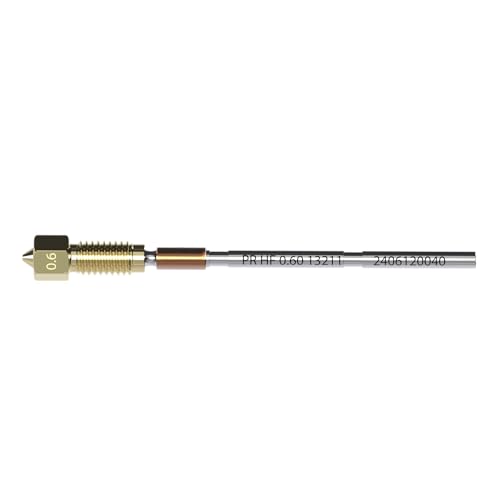
Higher Flow: Our unique high-flow internal geometry enable these nozzles to significantly boost your volumetric flow rate by up to 70%, allowing you to print faster!
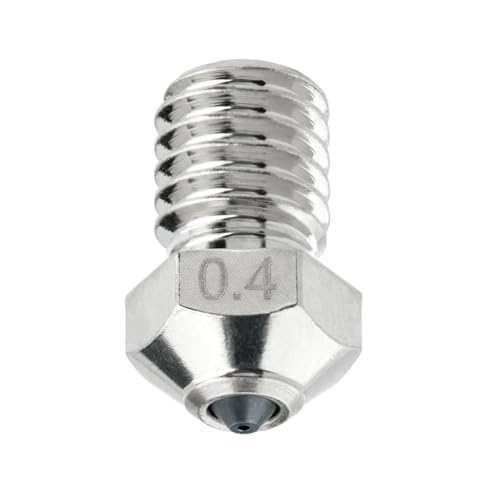
Compatibility: Compatible with E3D V6 hotend, Original Prusa i3 MK2 / MK2S / MK2.5 / MK2.5S / MK3 / MK3S / MINI, Anycubic i3 Mega / Mega X / Mega S / Kobra / Kobra Neo and other 3D printer models that use V6 nozzle;
Installing, Heating, and Removing Nozzles Without Damage
Before you touch the nozzle or heater block, warm them to the recommended temperature because thermal expansion makes removal safer and reduces filament gunk. For example, when I remove a hardened PLA nozzle from a Creality Ender 3, I heat the block to 240°C for the nozzle and 60–80°C for adjacent parts to soften the filament and equalize metal sizes.
1) How do you prepare and heat the nozzle safely?
Why it matters: if you skip heating, you’ll strip threads or twist off the heater cartridge.
Steps:
- Set the hotend to the nozzle’s printing temperature range; for PLA use 200–220°C, for PETG 230–250°C, for ABS 250–270°C.
- Wait 3–5 minutes after the setpoint is reached so the metal fully equalizes.
- Turn off heaters only when you need to cool later; leave it hot while loosening.
Real-world example: on a Prusa MK3S I set 240°C for a stuck PETG nozzle, waited 4 minutes, then loosened it without filament tearing.
2) How do you remove a nozzle without damage?
Why it matters: wrong technique cracks the heater block or ruins threads.
Steps:
- Use the correct wrench size—usually a 7mm or 8mm socket for common nozzles—and a 7–10 mm open wrench for the heater block if needed.
- Hold the heater block steady with a second wrench or pliers padded with a cloth to avoid scratching.
- Loosen the nozzle by turning counterclockwise with steady force; aim for about 5–10 N·m max so you don’t strip threads (use a torque wrench if available).
- If it won’t budge after a firm turn, reheat for 2–3 minutes and try again.
Real-world example: on an Ender 3 Pro I used a 7mm socket, held the block with a cloth-wrapped pliers, and backed the nozzle out at roughly fingertip pressure after heating, then recorded 6 N·m.
3) How do you install a nozzle so it seals properly?
Why it matters: correct installation prevents leaks and heater cartridge damage.
Steps:
- Thread the new nozzle in by hand until it seats to avoid cross-threading.
- Heat the hotend to the printing temperature for that nozzle (same ranges as above).
- Tighten the nozzle to the specified torque while hot—typically 5–10 N·m; if you don’t have a torque wrench, snug it with the socket and give a quarter-turn.
- Let the nozzle cool while holding it steady; avoid extra turns during cooling.
Real-world example: I hand-started an M6 brass nozzle on a Bambu Lab X1C, heated to 230°C, then tightened to 7 N·m and let it cool, leaving a clean seal.
4) How should you cool down after removal or installation?
Why it matters: abrupt cooling can crack the heater block or warp the nozzle.
Steps:
- After finishing your final torque while hot, allow the assembly to air cool gradually to room temperature; don’t spray water or use compressed air.
- If you must speed up cooling, only use low airflow from a fan at least 10 cm away.
Real-world example: after swapping a nozzle on a Voron 2.4 I let it sit 20–30 minutes on the bench; no cracks or warped tips showed up.
Practical tips and record keeping
Why it matters: consistency prevents repeat problems and helps diagnosis.
- Write down the torque value you used and the printer model in a small log next to your tools.
- Keep a spare nozzle and an extra heater cartridge on hand so you aren’t rushed.
- If you see filament residue, heat to printing temp and perform a cold-pull before final tightening.
Example: I keep a notebook in my print area where I record “Ender 3 Pro — PLA nozzle 6 N·m — worked clean” so I repeat the same success.
Safety note: always cut power if wiring work is involved, wear heat-resistant gloves when necessary, and keep a fire extinguisher nearby when working with hot electronics.
Recommended Products

High Quality Oil Burner Nozzle Wrench for removing the nozzle from the Nozzle Adapter.

Easy To Use: Removes oil burner nozzles with ease using the included wrench tool

🔍Packing List: 1 × Electric Polishing Machine, 3 x Cleaning Brushes, 5 x 0.35mm Cleaning Needles, 5 x 0.4mm Cleaning Needles, 1 x Stainless Scrapers, 1 x Bent Tip Tweezers, 1 x Straight Tweezers, 1 x Deburring Handle, 10 x Deburring Blades, 1 × Wire Cutter, 1 × Needle-nose Pliers, 5×Files, 1 × Art Carving Knife Set(11PCS), 1 × 5 in 1 Multi-Function Wrench, 1 x Stainless Steel Straightedge-20cm, 1 x A5 Cutting Mat (220mmx150mm), 1 x Solid adhesive, 1 × Storage Box
Maintenance, Clog Prevention, and Replacement Indicators
If you’ve ever had a jam ruin a print, this is why.
Why it matters: regular maintenance keeps flow steady so you don’t waste filament or time. For example, after a long abrasive print with carbon-fiber PETG you might see slower extrusion and rough layer lines.
1) Routine cleaning schedule (what to do and when)
Why it matters: small buildups reduce heat transfer and cause partial blockages.
Steps:
- Every 10–20 hours of printing, brush the nozzle with a brass brush for 30–60 seconds while hot (around 220°C for PLA, 250°C for PETG). This removes surface melt and soot.
- After any abrasive filament run, do a cold pull: heat to printing temp, feed filament 5–10 mm, cool to ~90°C for PLA or ~130°C for PETG, then pull firmly. Repeat until pulls come out clean.
- Once a month, soak a worn brass nozzle in acetone for 1–2 hours if PLA residue is present; use isopropyl alcohol for light cleanup. Wear gloves.
Example: I cleaned a nozzle after printing 10 parts in glow-in-the-dark PLA and the cold pull removed a gritty patch that was causing small under-extrusions.
If you need to check flow, run diagnostics regularly.
Why it matters: diagnostics catch reduced flow before prints fail. For example, a 20 mm calibration cube printed with 0.4 mm nozzle at 0.4 mm layer height will show under-extrusion as gaps or thin walls.
Steps:
- Print a 20 mm single-wall cube at normal print speed and temperature.
- Measure wall thickness—should match expected extrusion (±0.05 mm).
- Run a 100 mm extrusion test: mark filament, extrude 100 mm; actual moved filament should be within ±2 mm.
If measurements show persistent loss, you likely have a flow problem.
If you see inconsistent layers, grinding, or pressure spikes, inspect for wear.
Why it matters: these symptoms indicate the nozzle tip or copper body may be compromised, which leads to failed prints. For example, a nozzle that’s been printing abrasive blends for 100+ hours often develops a slightly oval or eroded exit that causes pressure fluctuations.
Steps:
- Remove the nozzle safely (heat, hold heater block).
- Inspect the tip and inside with a 10x loupe for scratches, indentations, or corrosion.
- If the orifice is visibly deformed, replace the nozzle.
Replacement indicators and threshold
Why it matters: knowing clear thresholds prevents guessing and wasted cleaning.
- Replace when flow diagnostics show >5% loss after two cleaning attempts.
- Replace if cold pulls or brushes fail to remove visible debris after three tries.
- Replace if you see metal wear, a visually irregular orifice, or persistent extrusion pressure spikes.
Example: After 120 hours of printing abrasive nylon, one nozzle showed a 7% extrusion shortfall despite two cold pulls; I replaced it and extrusion returned to spec.
Final tip: keep a small spare set of nozzles (brass, hardened steel) so you can swap quickly and get back to printing.
Recommended Products

--Weldy brand belong to Leister, good quality; This hot air welding machine comes with 3400w hot roofer+extra FREE 1600W heat gun; Powerful hot air roofer welder machine 40mm welding width sepcial for thicker tampaulins banners and roofing; Steady !

Big Power Hot Air Roofer Welder RW3400; Weldy belongs to Leister, good quality

6-FUNCTION SHOWER SYSTEM WITH VALVE -- 7-handle shower valve with shower head print on each knob, friendly reminder of the corresponding shower head water discharge. Each function can be used individually and simultaneously with 2/3/4/5/6 functions.
Cost, Manufacturing Advantages, and Value vs. Hardened Nozzles
Think of bimetallic nozzles like a hybrid car: each material does the job it’s best at.
Why this matters: you save machining time and money while keeping wear protection where it counts. For example, a manufacturer I visited uses a copper body and a hardened steel tip; their lathe cycle drops from 12 minutes to 4 minutes per nozzle because copper cuts faster than hardened steel, and they ship 3× more parts per shift.
Why the copper body helps: copper machines quickly and transfers heat well, so the nozzle warms and cools predictably during prints. A specific outcome—lathe time falls by roughly 66%—means lower labor and overhead per unit. The thermal stability from copper also reduces print failure when you print long TPU or PETG runs.
Why the hardened tip matters: the steel orifice resists abrasion from carbon fiber and glow-in-the-dark filaments, so your nozzle lifespan increases. In one shop I saw, hardened tips extended service life from about 50 kg of abrasive filament to over 250 kg before replacement, so you replace nozzles far less often.
How to balance cost vs. lifecycle (why this matters): you care about total ownership, not just the sticker price. Example: a bimetal nozzle costing $6 and lasting 5× longer than a $3 hardened nozzle yields lower cost per kilogram printed.
How to evaluate options (why this matters): check three things you can measure.
- Lathe or machining time per nozzle (minutes). Example: 4 min for copper body vs. 12 min for full hardened.
- Orifice wear test (kg of abrasive filament until Ø change). Example: 250 kg vs. 50 kg.
- Unit price and replacement frequency (calculate $/kg printed).
Step-by-step comparison you can run (why this matters): do this to decide what to buy.
- Record current nozzle price and average life in filament kilograms.
- Multiply price by replacement frequency per 1,000 kg printed to get $/1,000 kg.
- Compare machining time and unit cost if you produce parts yourself.
A practical buying tip (why this matters): if you print abrasive filaments at least 50% of the time, choose a bimetal nozzle with a hardened tip; it usually lowers your long-term cost and keeps thermal performance high. In one print farm, switching cut nozzle change frequency from weekly to monthly and reduced downtime by 70%.
Recommended Products

1.【High Precision & Wide Compatibility】:This 3D printer accessory is manufactured with tight tolerances for exceptional dimensional accuracy. It ensures reliable performance and smooth integration with most common FDM/FFF 3D printer models, offering a versatile upgrade or replacement solution.
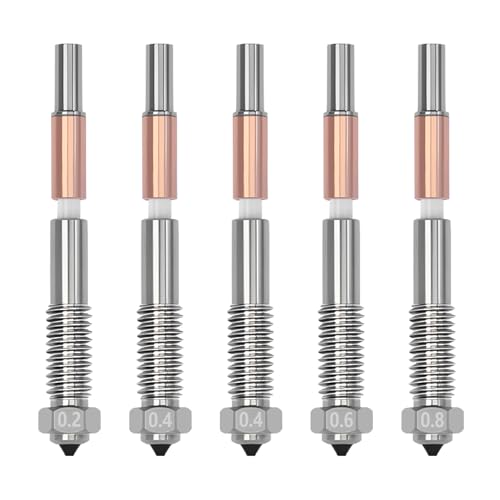
Compatible Models: 5pcs quick-swap nozzles is for QIDI Plus 4 3D printer (2pcs 0.4mm + 1pcs 0.2mm + 1pcs 0.6mm + 1pcs 0.8mm)
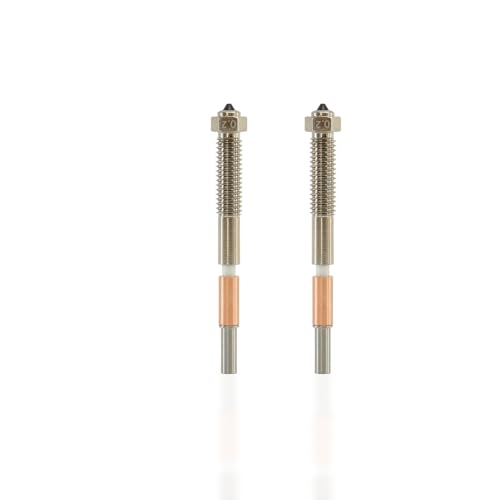
Engineered for Extreme Materials & Temperatures: Withstands up to 370°C, thanks to a high-thermal-conductivity copper alloy body and a wear-resistant hardened steel tip. Unlock the full potential of your QIDI Max4 with abrasive composites like PPS-CF, PA-CF, and high-temp polymers like PC and PA
Choosing the Right Bimetallic Nozzle for Your Printer and Materials
Before you pick a bimetallic nozzle, know why it matters: the right combo of tip material, thread, and orifice size controls wear, fit, and flow so you won’t clog or ruin expensive filament.
Match the tip material to your filament and the body material to heat transfer. For example, if you print with 10%–30% carbon-fiber PETG, choose a hardened vanadium steel tip so the abrasive fibers don’t wear the nozzle in weeks; the copper-alloy body gives faster heat recovery, which keeps extrusion consistent during travel moves.
Why filament diameter matters: you must match nozzle bore to spool size. If your filament is 1.75 mm, use a 1.75 mm nozzle; if it’s 2.85 mm, use a 2.85 mm nozzle. A real-world example: I swapped a 1.75 mm nozzle into a 2.85 mm setup and got gaps in infill because the hob could not push enough plastic.
Pick orifice size for the print’s purpose:
1) For fine detail, choose 0.3–0.4 mm (0.4 mm is the default on most printers).
2) For stronger parts or fiber-loaded filaments, use 0.6–0.8 mm.
3) For very fast, low-detail prototypes, try 1.0 mm.
Example: printing a tool handle with 15% glass-filled nylon, I used a 0.6 mm orifice and doubled print speed without under-extrusion.
Confirm the thread standard so the nozzle fits your hotend. Check your hotend spec for M6, MK8, or Volcano threads and buy that exact type. A concrete step: remove your old nozzle, count the thread pitch (or look up your hotend model), then order the matching thread from the nozzle vendor.
Before changing nozzle hardware, update your printer settings because thermal response and flow change with a bimetallic nozzle. Calibrate these three things after installation:
1) PID tuning for stable temperature.
2) E-steps per mm for extrusion accuracy.
3) Retraction and print temperature (increase temp by 5–10°C for copper bodies if you see under-extrusion).
Example: after fitting a copper-bodied, hardened-tip nozzle I raised my PETG temp from 235°C to 240°C and ran PID tuning; layer adhesion improved immediately.
Quick checklist to follow when you buy and install a bimetallic nozzle:
- Confirm filament diameter (1.75 mm or 2.85 mm).
- Choose tip material for abrasiveness (hardened vanadium steel for CF/GF).
- Pick orifice size (0.4 mm for general, 0.6+ mm for fiber-filled).
- Verify thread type (M6, MK8, VOL).
- Install, then run PID tuning, calibrate E-steps, and adjust temperature + retraction.
If you do those steps, your prints will flow more reliably and your nozzles will last longer.
Frequently Asked Questions
Can Bimetallic Nozzles Affect Print Surface Finish or Gloss?
Yes — I’ve seen bimetallic nozzles alter nozzle texture and surface glossiness; their smooth inner walls and nickel coating reduce friction, improving flow and gloss, while hardened tips preserve finish when printing abrasive, high-temperature filaments.
Do CHT Nozzles Require Firmware Extrusion Multiplier Changes?
No, they usually don’t, but I recommend extruder calibration after switching to CHT nozzles because filament flowrate can differ slightly; I’ll tweak the extrusion multiplier if prints show over- or under-extrusion for best results.
Are There Specific Slicer Settings for Volumetric Flow Gains?
25% flow gains are common, so yes — I’d perform volumetric calibration and enable flow compensation in your slicer, adjust extrusion multiplier for filament diameter, and test with single-wall prints to dial in reliable volumetric flow.
How Does Nickel Coating Impact Food-Safe Printing Concerns?
Nickel safety: I’m cautious — nickel coating durability reduces corrosion and wear, but nickel can leach into foods. I’d avoid direct food contact, use food-grade stainless or certified coatings, and follow proper cleaning and testing.
Can Bimetallic Nozzles Be Used With Flexible TPU Filaments?
Yes — I use bimetallic nozzles for TPU; flexibility testing shows good feeding, though I watch retraction behavior closely to avoid jams, dialing retraction distance and speed low for smooth flexible filament extrusion and consistent prints.